




Skip to content
View in the app

A better way to browse. Learn more.

BariatricPal

A full-screen app on your home screen with push notifications, badges and more.

To install this app on iOS and iPadOS
  1. Tap the Share icon in Safari
  2. Scroll the menu and tap Add to Home Screen.
  3. Tap Add in the top-right corner.
To install this app on Android
  1. Tap the 3-dot menu (⋮) in the top-right corner of the browser.
  2. Tap Add to Home screen or Install app.
  3. Confirm by tapping Install.

Join BariatricPal free

  • Ask your own questions
  • Reply and follow topics
  • Message other members
  • No cost, no spam

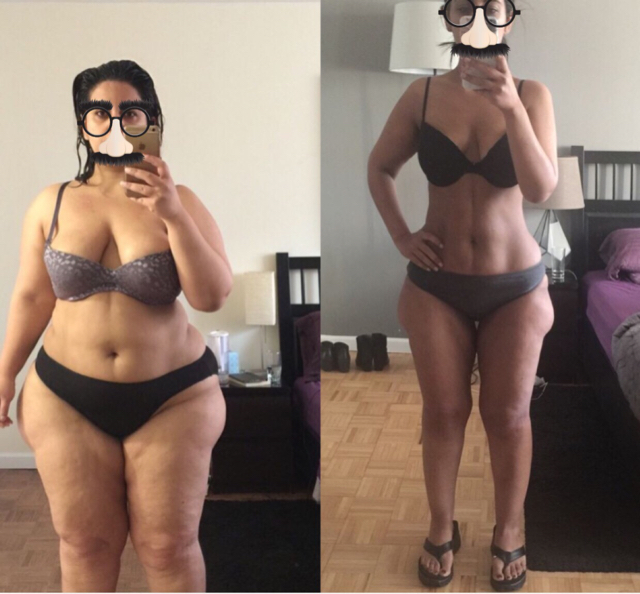
9 months and 94 lbs lost. Progress Photo!

SW: 244

CW: 150

GW: 140

I still sometimes think someone's playing a joke on me - after 10 years of feeling awful, my body finally feels really healthy and I'm loving what I see in the mirror.

Best thing I've ever done!IMG_3583.JPG
  • Replies 33
  • Views 2.3k
  • Created
  • Last Reply

Featured Replies

Whoot whoooot Congrats !!

Incredible progress..congrats!!!! :)

Thanks for sharing your progress! Those results are wonderful! Inspiring to those of us at the start of journeys. I'm going in for surgery this Saturday and am feeling hopeful for similar good results. What advice would you give new sleevers like me?


Wow, you look so incredible! Way to go!!!

Wow


Archived

This topic is now archived and is closed to further replies.

Account

Navigation

Search

Search

Configure browser push notifications

Chrome (Android)
  1. Tap the lock icon next to the address bar.
  2. Tap Permissions → Notifications.
  3. Adjust your preference.
Chrome (Desktop)
  1. Click the padlock icon in the address bar.
  2. Select Site settings.
  3. Find Notifications and adjust your preference.