



Skip to content
View in the app

A better way to browse. Learn more.

BariatricPal

A full-screen app on your home screen with push notifications, badges and more.

To install this app on iOS and iPadOS
  1. Tap the Share icon in Safari
  2. Scroll the menu and tap Add to Home Screen.
  3. Tap Add in the top-right corner.
To install this app on Android
  1. Tap the 3-dot menu (⋮) in the top-right corner of the browser.
  2. Tap Add to Home screen or Install app.
  3. Confirm by tapping Install.

Join BariatricPal free

  • Ask your own questions
  • Reply and follow topics
  • Message other members
  • No cost, no spam

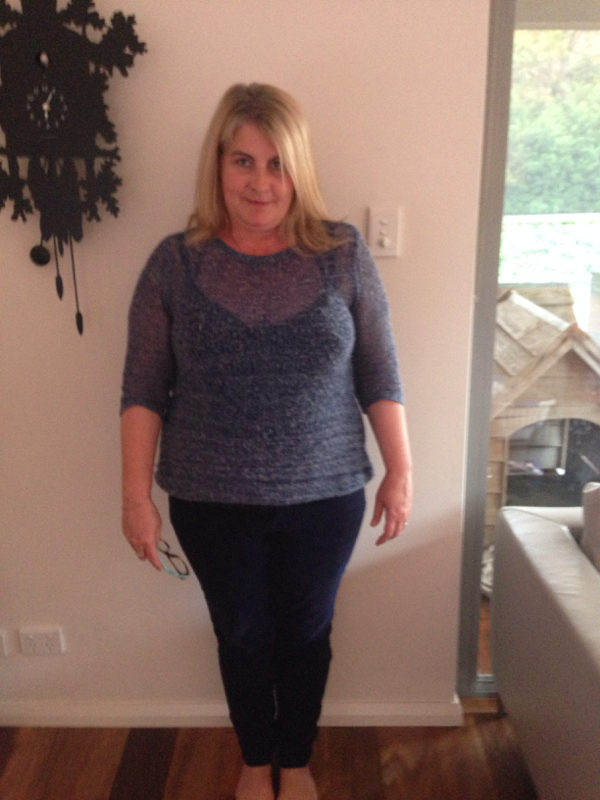
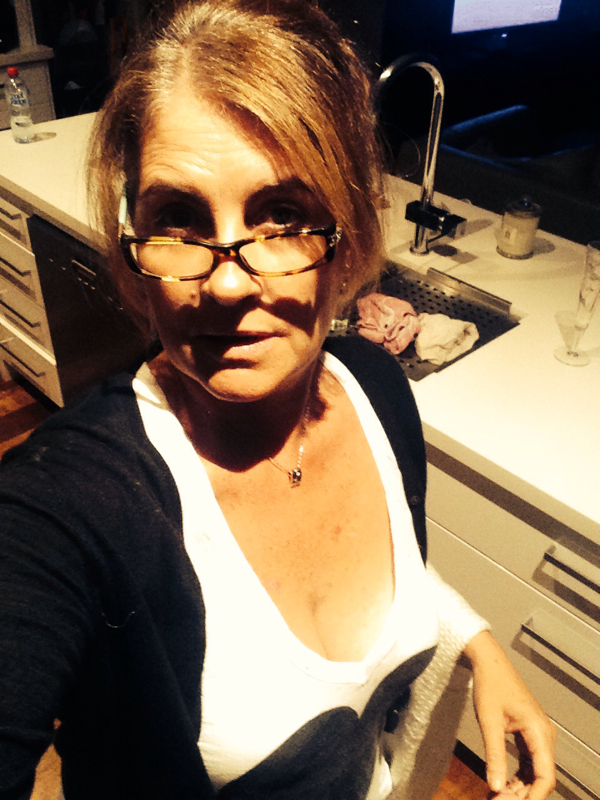
8 minths and 66 pounds. Before and after!

  • Replies 12
  • Views 2k
  • Created
  • Last Reply

Featured Replies

Wow ! What a difference in you face ! I cant see your tummy area in the 2nd pic , but assume you look great there too. Congratulations on all your hard work !

  • Author

Thanks so much. I am still avoiding full body shots out of habit!

Wow, way to go -- you look amazing! So happy for you!

Congrats!!!!

Congratulations! you look great!

Awesome!!!

so according to your profile you weigh 94 lbs/? and you want to weigh 69?

  • Author

Kilos !

  • 2 weeks later...

Wow what a great success you are!! Thanks for sharing the pictures. What an inspiration it is to see your pictures. You look great!!

  • 1 month later...

Some please tell me how to post pictures

Congratulations !

Archived

This topic is now archived and is closed to further replies.

Account

Navigation

Search

Search

Configure browser push notifications

Chrome (Android)
  1. Tap the lock icon next to the address bar.
  2. Tap Permissions → Notifications.
  3. Adjust your preference.
Chrome (Desktop)
  1. Click the padlock icon in the address bar.
  2. Select Site settings.
  3. Find Notifications and adjust your preference.
