Skip to content
View in the app

A better way to browse. Learn more.

BariatricPal

A full-screen app on your home screen with push notifications, badges and more.

To install this app on iOS and iPadOS
  1. Tap the Share icon in Safari
  2. Scroll the menu and tap Add to Home Screen.
  3. Tap Add in the top-right corner.
To install this app on Android
  1. Tap the 3-dot menu (⋮) in the top-right corner of the browser.
  2. Tap Add to Home screen or Install app.
  3. Confirm by tapping Install.

Ready for pureed food stage

  • Replies 9
  • Views 907
  • Created
  • Last Reply

Top Posters In This Topic

Most Popular Posts

  • Bkprincess21
    Bkprincess21

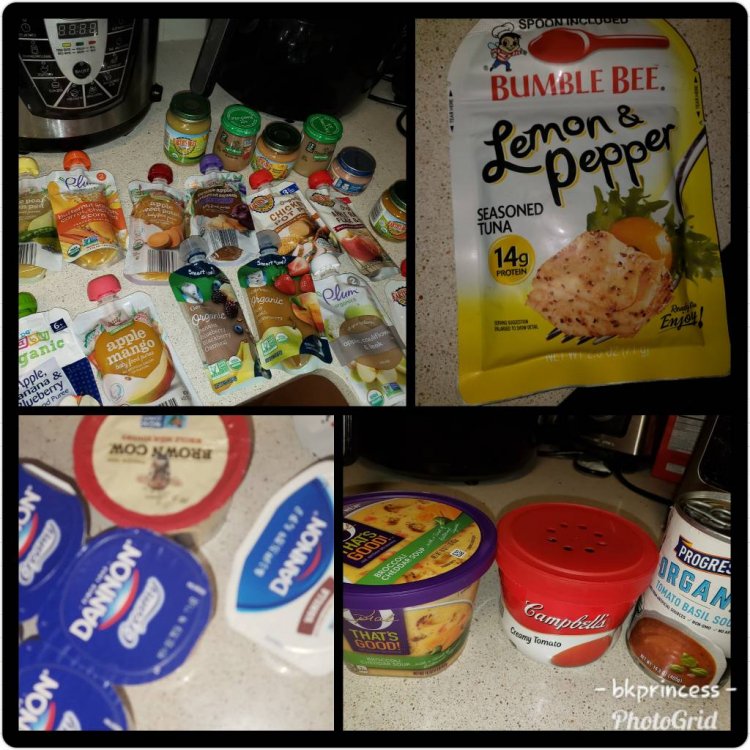
    Yeah I coupon so everything what I don't use well be donate

Posted Images

Featured Replies

Looks like you're well-prepared.

I just started the pureed phase yesterday and I'm so happy that I've been pureeing things for the last month and vacuum sealing them in little pouches and freezing. Yesterday was shrimp and spinach, today is asparagus and strawberries. Not mixed...eww

Just a word of warning ... I prepped just as you did, had a house full of purees on hand. And I ate about 10% of them. I donated or threw away 90%.

You will really be eating very little at this point. I still spent a lot of my day drinking protein shakes, to get the minimum in. That didn't leave a lot of time or stomach room for purees.

I'm currently in stage 2, and buying a tub of plain yogurt and mixing it with a tablespoon of the fruit purees are my favorite. I can't do the baby food, I just make regular food and stick it in my food processor.

I make one scrambled egg and eat less than half , it fills you up so quick it’s insane . But I missed my mashed potatoes and eggs lol so good but it’s such a waste since I can’t eat anything I’m just always full !

Join the conversation

You can post now and register later. If you have an account, sign in now to post with your account.

Guest
Reply to this topic...

Account

Navigation

Search

Search

Configure browser push notifications

Chrome (Android)
  1. Tap the lock icon next to the address bar.
  2. Tap Permissions → Notifications.
  3. Adjust your preference.
Chrome (Desktop)
  1. Click the padlock icon in the address bar.
  2. Select Site settings.
  3. Find Notifications and adjust your preference.