




Skip to content
View in the app

A better way to browse. Learn more.

BariatricPal

A full-screen app on your home screen with push notifications, badges and more.

To install this app on iOS and iPadOS
  1. Tap the Share icon in Safari
  2. Scroll the menu and tap Add to Home Screen.
  3. Tap Add in the top-right corner.
To install this app on Android
  1. Tap the 3-dot menu (⋮) in the top-right corner of the browser.
  2. Tap Add to Home screen or Install app.
  3. Confirm by tapping Install.

Join BariatricPal free

  • Ask your own questions
  • Reply and follow topics
  • Message other members
  • No cost, no spam

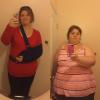
It's been a whole year now, where did the time go?!?

  • Popular Post

It's been a whole year since I took control of my life and had RNY gastric bypass. I've had ups and downs and physical delay after delay(chronic Lupus flares, swollen joints, torn rotator cuff, loss of ability to use my right arm, etc), but here we are! It's been one year and I don't regret it for one moment! I am not where I want to be YET, but I will get there. Here are my stats: hw:429lbs sw:386 cw:220lbspost-258512-14794773327168_thumb.jpg
  • Replies 34
  • Views 3.8k
  • Created
  • Last Reply

Featured Replies

Awesome!

Sent from my XT1254 using the BariatricPal App

It is wonderful for us old timers to see you shrink before our eyes. You look so much happier and healthier and dare I say. Younger!!!

Hurrah for you!!

Edited by Julie norton

You lost a whole (large) person!

Do people who haven't seen you in a while even recognize you?

!!!STRONG WORK!!!

Way to go! You inspire me! My stats are almost identical to yours, so those gives me hope that this will continue to work!

Great job! So happy for you. What a difference a year can make !!

That is TOTALLY AWESOMELY AMAZING!!! You have done so well!! KEEP ON KEEPING ON!!!

Amazing!! Congratulations! What an inspiration!!!

Sent from my iPad using the BariatricPal App

Archived

This topic is now archived and is closed to further replies.

Account

Navigation

Search

Search

Configure browser push notifications

Chrome (Android)
  1. Tap the lock icon next to the address bar.
  2. Tap Permissions → Notifications.
  3. Adjust your preference.
Chrome (Desktop)
  1. Click the padlock icon in the address bar.
  2. Select Site settings.
  3. Find Notifications and adjust your preference.