Start here
Where are you in your journey?
Choose the path that fits today. We’ll take you to the most useful discussions.
- GLP-1 medication Zepbound, Wegovy, access, side effects, progress, and support.
- Before surgery Compare procedures, plan ahead, and get honest pre-op answers.
- Post-op Recovery, food stages, symptoms, and support.
- Long-term Regain, labs, habits, and life after the honeymoon.
- Revision Explore revision options, complications, and next steps.
7 Month Update W/photos
- Replies 23
- Views 2.5k
- Created
- Last Reply
Featured Replies
Archived
This topic is now archived and is closed to further replies.
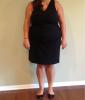
Hi VST Family, it's been awhile since I've posted on here and have finally gotten around to getting new pictures taken. It's been 7 months since surgery and I have lost 95 pounds. I feel so much better and have actually shopped in a regular women's clothing store for the first time in 19 years. This has been such an amazing journey and can't wait for it to continue down into onederland. Thanks to everyone on here for their amazing support and advice. I could not have done this without all of you.