Skip to content
View in the app

A better way to browse. Learn more.

BariatricPal

A full-screen app on your home screen with push notifications, badges and more.

To install this app on iOS and iPadOS
  1. Tap the Share icon in Safari
  2. Scroll the menu and tap Add to Home Screen.
  3. Tap Add in the top-right corner.
To install this app on Android
  1. Tap the 3-dot menu (⋮) in the top-right corner of the browser.
  2. Tap Add to Home screen or Install app.
  3. Confirm by tapping Install.

Join BariatricPal free

  • Ask your own questions
  • Reply and follow topics
  • Message other members
  • No cost, no spam

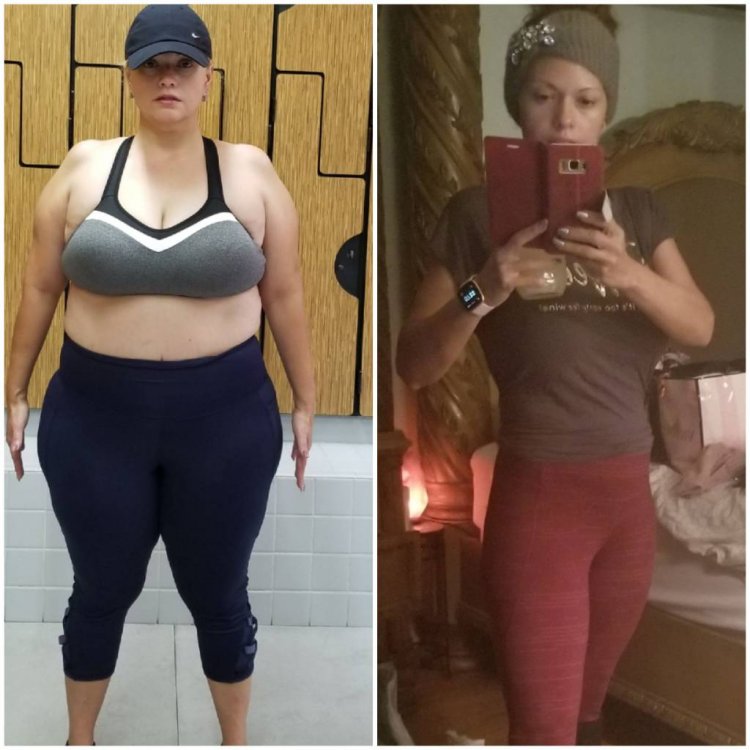
My 1 year sleeveversary!!!

  • Replies 23
  • Views 3.7k
  • Created
  • Last Reply

Top Posters In This Topic

Most Popular Posts

  • calicotrixie
    calicotrixie

    Woohoo! Way to go! I can’t wait until I can post the same!!!!!!!! Thanks for sharing!

  • Congratulations....this is beyond inspiring!!!

  • DaisyChainOz
    DaisyChainOz

    Wow... you look great! Congratulations and very well done
Posted Images

Featured Replies

You look amazing!!! Congrats

Darn, you look amazing!!!! Any tips for those of us going under the scope? First week pre-op or post-op tips? How'd you get through the liquid diet phase?

I did it!!! No regrets 20200101_181402.thumb.jpeg.c692aea117cee6ea4b6ac610bf6c72e2.jpeg

Congrats, you look fabulous!!

5'4"
Starting weight 297
VSG on 7/31/19
Surgery wt: 266
CW 211
GW 135

You look fabulous. A wonderful achievement. Congratulations.

WOW! As a male great job and you have to be working out also! Congratulations

  • Author

Thank you all...I never stopped exercising and I always watched what I ate...did I have set backs yes..did I plateau absolutely...but I kept going I went in weight was 220 I am 131 this morning...I do want to get to 125 and continue to tone my body ..

WOOOOOOOOOWWWWW

I did it!!! No regrets 20200101_181402.thumb.jpeg.c692aea117cee6ea4b6ac610bf6c72e2.jpeg

Wow!!!!!!!!! You are what I needed right now!!! Congrats and Thank you [emoji122][emoji122][emoji122][emoji176][emoji176][emoji176][emoji176][emoji176]

Wahoo!! Awesome job!

Join the conversation

You can post now and register later. If you have an account, sign in now to post with your account.

Guest
Reply to this topic...

Account

Navigation

Search

Search

Configure browser push notifications

Chrome (Android)
  1. Tap the lock icon next to the address bar.
  2. Tap Permissions → Notifications.
  3. Adjust your preference.
Chrome (Desktop)
  1. Click the padlock icon in the address bar.
  2. Select Site settings.
  3. Find Notifications and adjust your preference.