Skip to content
View in the app

A better way to browse. Learn more.

BariatricPal

A full-screen app on your home screen with push notifications, badges and more.

To install this app on iOS and iPadOS
  1. Tap the Share icon in Safari
  2. Scroll the menu and tap Add to Home Screen.
  3. Tap Add in the top-right corner.
To install this app on Android
  1. Tap the 3-dot menu (⋮) in the top-right corner of the browser.
  2. Tap Add to Home screen or Install app.
  3. Confirm by tapping Install.

Join BariatricPal free

  • Ask your own questions
  • Reply and follow topics
  • Message other members
  • No cost, no spam

Can we have the "Who liked" turned back on?

  • Popular Post

Can we please get the function restored so that when a user clicks on a post (like/confused/thanks/congrats/etc) that it shows us who did that? The case for when someone posts a confused face, it would be nice to see who that was so that the ability to address the confusion could be made.

Thanks!

  • Replies 14
  • Views 1.5k
  • Created
  • Last Reply

Top Posters In This Topic

Most Popular Posts

  • Alex Brecher
    Alex Brecher

    I wasn’t aware that this was disabled for certain groups. It’s now enabled again. Thanks for letting me know about this.

  • And there it is... Awesome, Thank you very much!

  • Oh it's on like Donkey Kong now! I will be sharing the love all over the place!!! (Hey Alex, could we get a "huggy" emoji to click on in response to posts? )

Posted Images

Featured Replies

I wasn’t aware that this was disabled for certain groups. It’s now enabled again. Thanks for letting me know about this.

  • Author
Just now, Alex Brecher said:

I wasn’t aware that this was disabled for certain groups. It’s now enabled again. Thanks for letting me know about this.

And there it is... Awesome, Thank you very much!

Sometime Alex and Ken S. please give us. a visual menu of these emjoi and the meaning you mean for each As an example I have been an user of the confused emjoi. To me it aknowlegement that I or the poster found something confusing and one of us is seeking clarification. one poster claimed I was ridiculing the. previous poster, that certainly was NOT my intention.

Oh it's on like Donkey Kong now! I will be sharing the love all over the place!!!

(Hey Alex, could we get a "huggy" emoji to click on in response to posts? :D )

8 hours ago, FluffyChix said:

Oh it's on like Donkey Kong now! I will be sharing the love all over the place!!!

(Hey Alex, could we get a "huggy" emoji to click on in response to posts? :D )

Added!

So you're suppose to see now who's liked your posts instead of getting the "somebody reacted to your post"?

I'm asking because it doesn't seem to work.

On 09/24/2018 at 03:20, summerset said:


I'm asking because it doesn't seem to work.


Not in your notifications, but on phone if you click on the hearts/reactions it’ll show you who reacted. On the computer I thought it just said who reacted at the bottom of the post, but I’m not sure!
Okay I guess it is showing up in my notifications now too, sorry!

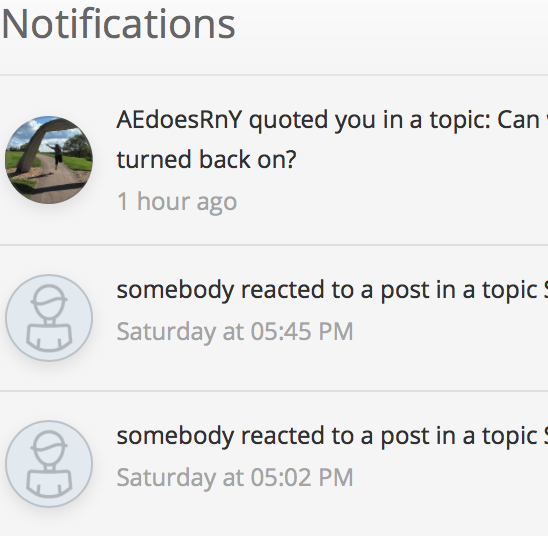
I can see that you quoted my posts in my notifications but I can't see who exactly liked one of my posts, only that someone "reacted to my posts".

Hm.

I can see that you quoted my posts in my notifications but I can't see who exactly liked one of my posts, only that someone "reacted to my posts".

Looks like this:

Bildschirmfoto 2018-09-24 um 14.24.22.png

9 hours ago, summerset said:

I can see that you quoted my posts in my notifications but I can't see who exactly liked one of my posts, only that someone "reacted to my posts".

Looks like this:

Bildschirmfoto 2018-09-24 um 14.24.22.png

Hi @summerset - I've just liked one of your posts. Can you please let me know if it's working as expected for you now?

Thanks in advance!

Join the conversation

You can post now and register later. If you have an account, sign in now to post with your account.

Guest
Reply to this topic...

Account

Navigation

Search

Search

Configure browser push notifications

Chrome (Android)
  1. Tap the lock icon next to the address bar.
  2. Tap Permissions → Notifications.
  3. Adjust your preference.
Chrome (Desktop)
  1. Click the padlock icon in the address bar.
  2. Select Site settings.
  3. Find Notifications and adjust your preference.