Skip to content
View in the app

A better way to browse. Learn more.

BariatricPal

A full-screen app on your home screen with push notifications, badges and more.

To install this app on iOS and iPadOS
  1. Tap the Share icon in Safari
  2. Scroll the menu and tap Add to Home Screen.
  3. Tap Add in the top-right corner.
To install this app on Android
  1. Tap the 3-dot menu (⋮) in the top-right corner of the browser.
  2. Tap Add to Home screen or Install app.
  3. Confirm by tapping Install.

Join BariatricPal free

  • Ask your own questions
  • Reply and follow topics
  • Message other members
  • No cost, no spam

Which phone apps do you use to remind you to take your vitamins??

I am having a devil of a time remembering to take my vitamins. I’m 6 days post surgery and for the life of me the mid day stuff just slips my mind. Which phone apps do you use to remind you to take your vitamins?? I’m using myfitnesspal to record the liquids and foods but I don’t see a way to remind me to take the “meds”.

TIA
Carol
  • Replies 13
  • Views 1.1k
  • Created
  • Last Reply

Top Posters In This Topic

Posted Images

Featured Replies

Baritastic is awesome! It works with fitbit and other fitness watches as well.

I've used Mango in the past and have loved it. Now I use my Monthly cycle reminder app (Period Tracker).

You can also use MFP as a reminder - I've switched some of my meal names to meds in the past. And set a reminder for those times.

Edited by MargoCL

I don't use an app for reminders - I bought this pill box on Amazon and organize my vitamins by when I need to take them. Each day I grab a box and it sits with me at work so it's front and center.

Then when I actually do take them I enter them in My Fitness Pal with my food so I don't have to remember if I really did take them or not. If all goes as planned by the time bedtime hits my pill box should be empty.

I do have an app to remind me when it's time to each and it's called MealReminder. You can customize the name of your reminders and set actually times so you could use this for vitamin reminders as well.

I've tried MyFitnessPal, but the darn thing just wont work. i'd love to find an app (that works on my kindle fire) that would help me track my diet AND exercise. maybe I need to make my own because what's out there stinks.

Just now, laurileet said:

I've tried MyFitnessPal, but the darn thing just wont work. i'd love to find an app (that works on my kindle fire) that would help me track my diet AND exercise. maybe I need to make my own because what's out there stinks.

What about it wouldn't work?

1 minute ago, laurileet said:

I've tried MyFitnessPal, but the darn thing just wont work. i'd love to find an app (that works on my kindle fire) that would help me track my diet AND exercise. maybe I need to make my own because what's out there stinks.

what doesn't work for you? I've been using it off / on for several years. The only time I stop is when I think I've found something better, but then always come back to MFP, the last time I upgraded to the premium edition. Which I love even more. Maybe I can help you figure it out. Do you only use it on your fire? Or do you use your phone too? You can also use it via PC

I use Medisafe and it's been amazing so far! I can even log what color/shape my pills are in. The alerts even pop up on my Samsung Galaxy watch.

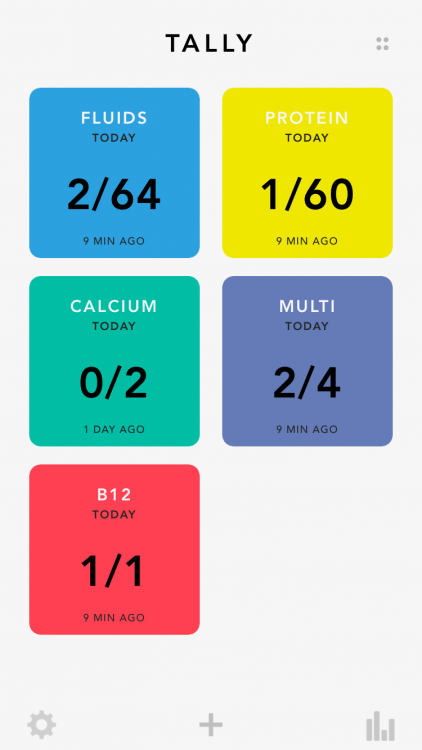
I use and LOVE "tally" to keep track of my water, protein, and vitamins! They have an app for the apple watch too which makes it super easy to track!

I use Medisafe too. I like it a lot.

I use Baritastic. I love this app

I use the reminder app that came with my iPhone.

Here's a screenshot of my "tally" app. The free version I think you can set up to 3-4 items to track, and then for like $0.99 you can unlock unlimited. You set the goals/reminder notifications/colors/order/etc, and it tracks your stats for you of when you remembered & didn't. I started using this months pre-op and have been using it since!

image.thumb.png.1fdb153fc26329794919bba3c7360982.png

Habit Minder! Best best best. I’ve tried a ton and this is clean, easy, reliable, and notifies my watch even if my phone is far

Join the conversation

You can post now and register later. If you have an account, sign in now to post with your account.

Guest
Reply to this topic...

Account

Navigation

Search

Search

Configure browser push notifications

Chrome (Android)
  1. Tap the lock icon next to the address bar.
  2. Tap Permissions → Notifications.
  3. Adjust your preference.
Chrome (Desktop)
  1. Click the padlock icon in the address bar.
  2. Select Site settings.
  3. Find Notifications and adjust your preference.