




Skip to content
View in the app

A better way to browse. Learn more.

BariatricPal

A full-screen app on your home screen with push notifications, badges and more.

To install this app on iOS and iPadOS
  1. Tap the Share icon in Safari
  2. Scroll the menu and tap Add to Home Screen.
  3. Tap Add in the top-right corner.
To install this app on Android
  1. Tap the 3-dot menu (⋮) in the top-right corner of the browser.
  2. Tap Add to Home screen or Install app.
  3. Confirm by tapping Install.

Join BariatricPal free

  • Ask your own questions
  • Reply and follow topics
  • Message other members
  • No cost, no spam

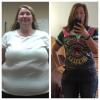
What a difference a year makes!

  • Popular Post

Today is my surgery anniversary. So glad I made this decision for myself! post-213005-14299694976879_thumb.jpg
  • Replies 27
  • Views 3.1k
  • Created
  • Last Reply

Featured Replies

You look amazing. I am soooo inspired. I am getting the sleeve next week. I hope I have the same success

  • 2 weeks later...

AWESOME!!!!

Wwwwoooow u did a real great Job ...Am just 20 days away from my Anniversary too ..but am still away from goal ..and hitting a plateau for 35 days now ....

Do u feel hungry very often?

I sometimes feel hungry before 2 and half hours

Oh, my gosh! I missed this thread. You have done just great. I'm sure your life is completely different, especially if you really are an LA cowgirl. Congrats. :)

You look fantastic!!

Congrats on your new life....what a difference a year makes it right! I am only hoping to have the same success as you.

Wow!! You look amazing! Keep up all the hard work! U must feel INCREDIBLE!!

You look awesome! Your SO better be treating you right :)

-RC-

  • Author

Oh, my gosh! I missed this thread. You have done just great. I'm sure your life is completely different, especially if you really are an LA cowgirl. Congrats. :)

post-213005-14344197298089_thumb.jpg

Archived

This topic is now archived and is closed to further replies.

Account

Navigation

Search

Search

Configure browser push notifications

Chrome (Android)
  1. Tap the lock icon next to the address bar.
  2. Tap Permissions → Notifications.
  3. Adjust your preference.
Chrome (Desktop)
  1. Click the padlock icon in the address bar.
  2. Select Site settings.
  3. Find Notifications and adjust your preference.