




Skip to content
View in the app

A better way to browse. Learn more.

BariatricPal

A full-screen app on your home screen with push notifications, badges and more.

To install this app on iOS and iPadOS
  1. Tap the Share icon in Safari
  2. Scroll the menu and tap Add to Home Screen.
  3. Tap Add in the top-right corner.
To install this app on Android
  1. Tap the 3-dot menu (⋮) in the top-right corner of the browser.
  2. Tap Add to Home screen or Install app.
  3. Confirm by tapping Install.

Join BariatricPal free

  • Ask your own questions
  • Reply and follow topics
  • Message other members
  • No cost, no spam

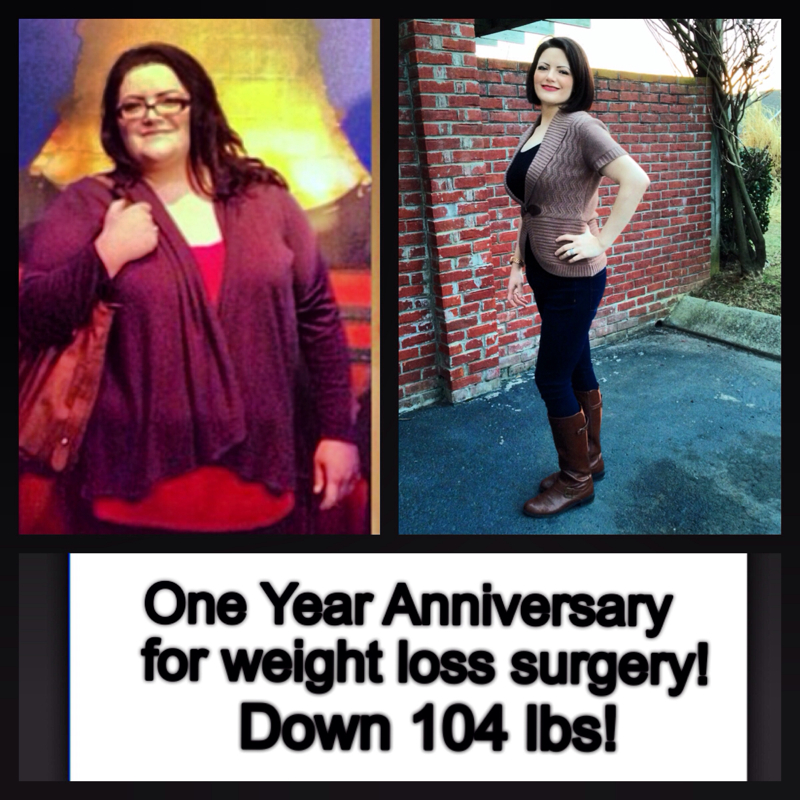
1yr post op very happy

  • Replies 15
  • Views 1.5k
  • Created
  • Last Reply

Featured Replies

Wow!!! Dramatic difference! So proud of you!! Thank you for sharing the encouragement!! :D

It is amazing to me how attractive people become after losing their weight. I know we are supposed to see people for who they are but you went from okay to DAMN!!! You look great congratulations on your weight loss and your new life. Pictures like this make me very excited to get my journey going. Let me say DAMN again you look great.

Edited by Chance1812

Congratulations you look Awesome!!!!

You look wonderful!!! What are your stats?

Beautiful before and after. Congratulations

Very nice! You should be very proud!

You are too fabulous!

Wow! Well done!

This might sound weird, but after look's like before's daughter.

This might sound weird, but after look's like before's daughter.

I completely agree with you!

Wow you look fabutastic!!!! Fabulous & fantastic put together because just one word does not describe your awesome transformation!!!! Congratulations on your success & may you continue to be so blessed along your journey!!!

Edited by cherbear33

Woo Hoo! I love these transformations, great job!

Fantastic

Congrats

Archived

This topic is now archived and is closed to further replies.

Account

Navigation

Search

Search

Configure browser push notifications

Chrome (Android)
  1. Tap the lock icon next to the address bar.
  2. Tap Permissions → Notifications.
  3. Adjust your preference.
Chrome (Desktop)
  1. Click the padlock icon in the address bar.
  2. Select Site settings.
  3. Find Notifications and adjust your preference.