Skip to content
View in the app

A better way to browse. Learn more.

BariatricPal

A full-screen app on your home screen with push notifications, badges and more.

To install this app on iOS and iPadOS
  1. Tap the Share icon in Safari
  2. Scroll the menu and tap Add to Home Screen.
  3. Tap Add in the top-right corner.
To install this app on Android
  1. Tap the 3-dot menu (⋮) in the top-right corner of the browser.
  2. Tap Add to Home screen or Install app.
  3. Confirm by tapping Install.

Join BariatricPal free

  • Ask your own questions
  • Reply and follow topics
  • Message other members
  • No cost, no spam

Hours and Hours of Entertainment!

  • Popular Post

Thank you again @MIZ60 for showing me how to implement use the strike through button! It's given me and will continue to give me hours upon hours minutes/seconds of joy and amusement. Merry Christmas, dollface!!!! ((hugs)) :lol:?;)

  • Replies 16
  • Views 1.8k
  • Created
  • Last Reply

Top Posters In This Topic

Most Popular Posts

Posted Images

Featured Replies

57 minutes ago, FluffyChix said:

given me and hours upon hours minutes/seconds of joy

@FluffyChix

its the little things that matter

when i learned to tie my shoes last month, I was ecstatic !!!?

kathy

congrats

  • Author
1 hour ago, Orchids&Dragons said:

Fluffy, I think you need a hobby!

IKR?????!!!! *snort*

Wait....that is too cool....I want in....how do you use the strike through button?! I need a hobby!?

  • Author
2 minutes ago, Letsgetgoing2018 said:

Wait....that is too cool....I want in....how do you use the strike through button?! I need a hobby!?

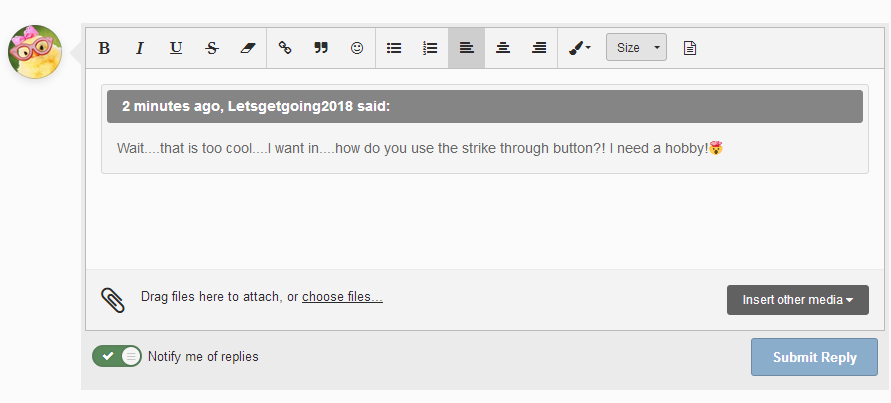
Ok, see this little S with the line through it? It's the 4th button from the left. Just type out the word you want to strike through and skip a space, the type the replacement word. Then you can go back and highlight the part you want to strike through and while it's highlighted, click the S button! Voila! Instant strike through and thanks to @MIZ60 who popularized it's use here, the trend will continue to grow until we take over the world no the universe! That's the ticket!

  • Author

Like I Kathy said, "It's the little things!" ;) hehe

No I can’t find the little s with a line thru! I want one!!! I have only the usual three: B I and U

  • Author
3 minutes ago, Biddy zz said:

No I can’t find the little s with a line thru! I want one!!! I have only the usual three: B I and U

image.png.7d9b79686935dcf1273e7f6e5e47d5db.pngimage.png.7d9b79686935dcf1273e7f6e5e47d5db.png

  • Author

It's a big S with a line through it.

No! I don’t have that!! Or the eraser.

I am gonna complain. This is discrimination, taking away my freedom of speech-erasure.

Or maybe I’ll Download the recent iPhone software update and see if that works!

  • Author

I'm on a desktop. Could that be the issue? Have you tried using on a tablet? Is it there? :lol: Who knew?!!

20 hours ago, FluffyChix said:

Thank you again @MIZ60 for showing me how to implement use the strike through button! It's given me and will continue to give me hours upon hours minutes/seconds of joy and amusement. Merry Christmas, dollface!!!! ((hugs)) :lol:?;)

You are more than welcome my pretty and it is truly life changing entertaining. Sometimes it just fits. I am always shocked when I figure out something new to me on the computer since I am quite computer impaired about most things. Have to get daddy my husband to come help me most times....?

Join the conversation

You can post now and register later. If you have an account, sign in now to post with your account.

Guest
Reply to this topic...

Account

Navigation

Search

Search

Configure browser push notifications

Chrome (Android)
  1. Tap the lock icon next to the address bar.
  2. Tap Permissions → Notifications.
  3. Adjust your preference.
Chrome (Desktop)
  1. Click the padlock icon in the address bar.
  2. Select Site settings.
  3. Find Notifications and adjust your preference.