Skip to content
View in the app

A better way to browse. Learn more.

BariatricPal

A full-screen app on your home screen with push notifications, badges and more.

To install this app on iOS and iPadOS
  1. Tap the Share icon in Safari
  2. Scroll the menu and tap Add to Home Screen.
  3. Tap Add in the top-right corner.
To install this app on Android
  1. Tap the 3-dot menu (⋮) in the top-right corner of the browser.
  2. Tap Add to Home screen or Install app.
  3. Confirm by tapping Install.

Join BariatricPal free

  • Ask your own questions
  • Reply and follow topics
  • Message other members
  • No cost, no spam

UPDATE YOUR STATS; it makes it easier for others to answer your questions

  • Popular Post

I accidentally double-posted another topic so I thought I'd erase that duplicated content and put something else in its place. Is this the best I could do? Apparently. Did I put much effort into thinking of something else to post? Not really.

Anyway... in case you've forgotten how to update your stats (all the information under your username) try following these steps.

Make sure your dog, cat, or bird is watching so you can impress them. :)

1. Go to PATIENTS (top of page).

2. Select MY SURGERY.

3.a. Update the information under SURGERY

3 b. Select PROGRESS (see squiggly arrow on left side of screen) to update even more!

4. Paste a gold star in the middle of your forehead. Good job!

While you're at it.... upload a photo or an animation above your username.

If there's anything else you don't know, ask someone else. Just kidding. No, really. Ask someone else. I probably don't know.

Edited by Missouri-Lee's Summit

  • Replies 18
  • Views 1.9k
  • Created
  • Last Reply

Top Posters In This Topic

Most Popular Posts

  • I've asked a few times and I have a post in the suggestions forum for this very reason. None of the site staff have bothered to chime in though. Guess it's not a priority for them to have the site a

  • That's entirely possible, just wish someone would speak up from the site... I can't fathom having a forum specifically for asking for site help and then not having someone from the site bother to even

  • I think most people are on mobile devices and you cant update on them, the option isnt there. I update when i actually sit down at a computer which is very rare.
Posted Images

Featured Replies

6 hours ago, Missouri-Lee's Summit said:

I accidentally double-posted another topic so I thought I'd erase that duplicated content and put something else in its place. Is this the best I could do? Apparently. Did I put much effort into thinking of something else to post? Not really.

Anyway... in case you've forgotten how to update your stats (all the information under your username) try following these steps.

Make sure your dog, cat, or bird is watching so you can impress them. :)

1. Go to PATIENTS (top of page).

2. Select MY SURGERY.

3.a. Update the information under SURGERY

3 b. Select PROGRESS (see squiggly arrow on left side of screen) to update even more!

4. Paste a gold star in the middle of your forehead. Good job!

While you're at it.... upload a photo or an animation above your username.

If there's anything else you don't know, ask someone else. Just kidding. No, really. Ask someone else. I probably don't know.

No that's really a great idea ;)

I think most people are on mobile devices and you cant update on them, the option isnt there. I update when i actually sit down at a computer which is very rare.

  • Author

Good to know, Chrisb428.

Anybody Interested in any,of mine? OKAY?*****Frustr8**
Lowest Lifetime Weight 7lb12oz
At birth December 26 1945
Highest Admitted-To Weight 355 lb October 2017
Current Weight 318 lb( lost 3 lb,on Verdompt Liquid pre-diet)
Surgical Weight- to be determined
First Goal Weight less than 200 lb
Second Goal 175lb or 15 junior
Medical staff dream 140 lb for decent BMI
Frustr8,Personal Goals
Less Arthritis Pain
Perform Activities my weight precludes me from
Less shortness of breath
Being healthier
Being more Fit
Living Longer
Being of help to others
Serving God by loving others in His Name
Proving my worth to the World
And to Quote the Snow Sisters on Texas Flip and Move It (DIY TV)
A Texas Saying-- Everything else,is Gravy on the Biscuit!
Oh Yes
Surgical Date September 5th 2018 at 7 AM EDT
SURGEON-' Bradley J Needleman MD-- Director,of Bariatric Surgery and Metabolic Weight Loss at
the Ohio State University HOSPITAL-WEXNER Medical center in Columbus Ohio 43210
Type Surgery Planned: RnY Bypass and Hiatal Hernia Repair
Present State of Mind: Hoprful, Excited and a Little Bit in Awe of the Proceedings
On 8/11/2018 at 9:12 AM, Chrisb428 said:

I think most people are on mobile devices and you cant update on them, the option isnt there. I update when i actually sit down at a computer which is very rare.

I've asked a few times and I have a post in the suggestions forum for this very reason. None of the site staff have bothered to chime in though. Guess it's not a priority for them to have the site and app provide the same user experience.

Sure keep hoping that will happen, I keep going on and trying to update and the app is like Teflon, as soon as 70,ileave the facts slide away. That's why I listed all of,mine above, I hope against hope, Ken S will take pity and transfer them over! HONEST FOLKS I KEEP TRYING!???
13 minutes ago, Matt Z said:

I've asked a few times and I have a post in the suggestions forum for this very reason. None of the site staff have bothered to chime in though. Guess it's not a priority for them to have the site and app provide the same user experience.

That would take a qualified app developer, which they may not have, and from my user experience across multiple app platforms that seems to be the case...

Just now, GreenTealael said:

That would take a qualified app developer, which they may not have, and from my user experience across multiple app platforms that seems to be the case...

That's entirely possible, just wish someone would speak up from the site... I can't fathom having a forum specifically for asking for site help and then not having someone from the site bother to even take the time to acknowledge the post.

Ok guys, pls don't laugh at me if this is stupid.... Is there a way to see who "likes" or reacts to your posts?

6 minutes ago, Chrisb428 said:

Ok guys, pls don't laugh at me if this is stupid.... Is there a way to see who "likes" or reacts to your posts?

On the app yes (might just be the IOS app though, because even though @AshAsh1 has shown me screenshots, I cannot see any like / reaction information on the Android version of the app), on the website, no.

Edited by Matt Z

6 minutes ago, Matt Z said:

On the app yes (might just be the IOS app though, because even though @AshAsh1 has shown me screenshots, I cannot see any like / reaction information on the Android version of the app), on the website, no.

I personally think instead of saying "someone" reacted, it should just tell u who. Maybe I'm just more curious than most...lol. Who knows

Oh no, we can too. On the lower right where it might say 2? you hit that and it says like --MattZ and Orchids and Dragons liked your post. That's one thing they didn't forget.
On 08/14/2018 at 10:09, Chrisb428 said:


Ok guys, pls don't laugh at me if this is stupid.... Is there a way to see who "likes" or reacts to your posts?


Yes, on the app I can. I have an Apple phone. You tap on the emojis and it shows you.

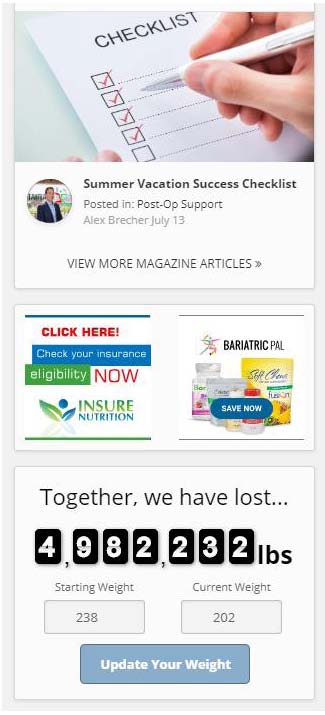
So, there is a shortcut I use when updating my weight. On every page on right hand side when at a computer, there is a long column of featured surgeons, ads, recent status updates, trending news, etc. On the very bottom is a ticker to show how much weight we've all lost titled "together we have lost". In that ticker, if you enter your updated weight, then your stats are updated in your profile.

.5b7719f87a2c5_weightupdate..jpg.cbb13d6aaf412e90035a395b0e7158c3.jpg

Join the conversation

You can post now and register later. If you have an account, sign in now to post with your account.

Guest
Reply to this topic...

Account

Navigation

Search

Search

Configure browser push notifications

Chrome (Android)
  1. Tap the lock icon next to the address bar.
  2. Tap Permissions → Notifications.
  3. Adjust your preference.
Chrome (Desktop)
  1. Click the padlock icon in the address bar.
  2. Select Site settings.
  3. Find Notifications and adjust your preference.