Skip to content
View in the app

A better way to browse. Learn more.

BariatricPal

A full-screen app on your home screen with push notifications, badges and more.

To install this app on iOS and iPadOS
  1. Tap the Share icon in Safari
  2. Scroll the menu and tap Add to Home Screen.
  3. Tap Add in the top-right corner.
To install this app on Android
  1. Tap the 3-dot menu (⋮) in the top-right corner of the browser.
  2. Tap Add to Home screen or Install app.
  3. Confirm by tapping Install.

Join BariatricPal free

  • Ask your own questions
  • Reply and follow topics
  • Message other members
  • No cost, no spam

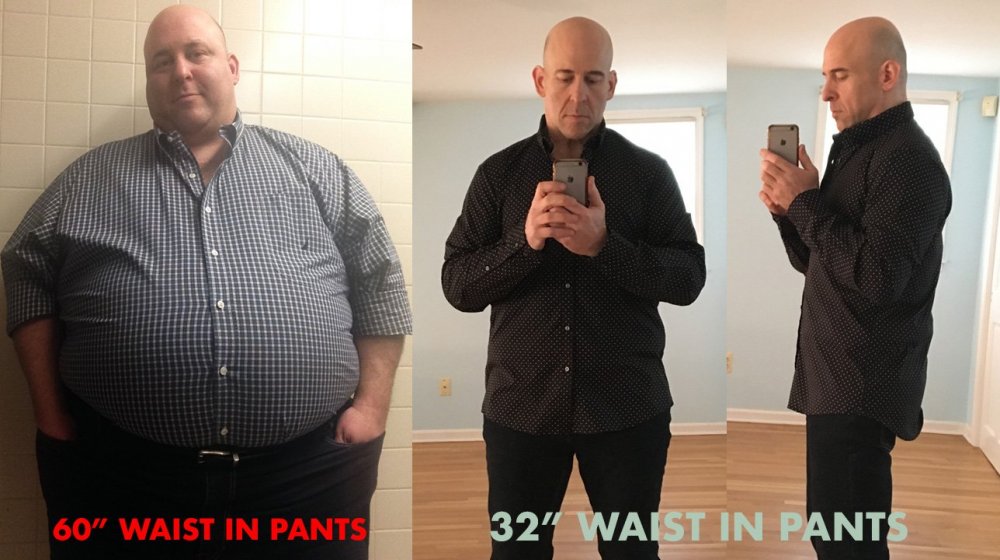
60" waist to 32" photo

  • Popular Post

After my last post, people asked for photos, so here's a photo of me from around my top weight of 485 or so wearing 60" waist pants. The newer photo I took today where I am wearing a 32" waist.

after.jpg

  • Replies 22
  • Views 5.3k
  • Created
  • Last Reply

Top Posters In This Topic

Most Popular Posts

Posted Images

Featured Replies

I don't know if this is too personal (I am scheduled for my surgery in a couple weeks).

Did you have to get follow up plastic surgery for excess skin?

I am wondering if I need to plan on it, I started a little over 350lbs and hopefully drop 100-150lbs range.

Amazing! Congrats!!!

  • 3 months later...

Holy crap, That's amazing. You look like a different guy. Congrats RussT

Looking like Walter White on Breaking Bad . Good job man!

You were handsome at your highest and you still are but wow damn good job! Way to go.

Join the conversation

You can post now and register later. If you have an account, sign in now to post with your account.

Guest
Reply to this topic...

Account

Navigation

Search

Search

Configure browser push notifications

Chrome (Android)
  1. Tap the lock icon next to the address bar.
  2. Tap Permissions → Notifications.
  3. Adjust your preference.
Chrome (Desktop)
  1. Click the padlock icon in the address bar.
  2. Select Site settings.
  3. Find Notifications and adjust your preference.