




Skip to content
View in the app

A better way to browse. Learn more.

BariatricPal

A full-screen app on your home screen with push notifications, badges and more.

To install this app on iOS and iPadOS
  1. Tap the Share icon in Safari
  2. Scroll the menu and tap Add to Home Screen.
  3. Tap Add in the top-right corner.
To install this app on Android
  1. Tap the 3-dot menu (⋮) in the top-right corner of the browser.
  2. Tap Add to Home screen or Install app.
  3. Confirm by tapping Install.

Join BariatricPal free

  • Ask your own questions
  • Reply and follow topics
  • Message other members
  • No cost, no spam

It's a life changer - progress pics 2.5 months out

  • Popular Post

Hi, guys. Just wanted to share a progress pic and celebrate with you all. Went to the sleep doctor today, and for the first time ever, I didn't dread stepping on the scale. :)
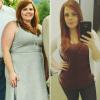
I enjoy moving more and have so much energy.

You all gave me tons of candid insight into the process - thank you! Was a great choice for me.

HW/SW 231
CW 191 (40 lbs down!)
Sleeved 11/7/16

Instagram: a_sleeved_story

post-298330-14852182847089_thumb.jpg

Edited by lore

  • Replies 47
  • Views 4.8k
  • Created
  • Last Reply

Featured Replies

  • Author

Beautiful. What is your goal?

Sent from my iPhone using the BariatricPal App

Thank you. 135 by December.

Sent from my XT1635-01 using the BariatricPal App

Holy Moly!! You look FAB!

  • Author

Wowza!!!! You are doing great and you look amazing. Isn't it weird to be OK with stepping on the scale at the doctor's office????

Haha yes, so strange! And thank you :)

Sent from my XT1635-01 using the BariatricPal App

Congratulations and well done. How amazing to have that change in just 2.5 months. Wish you well this year.

You look great!

Sent from my SAMSUNG-SM-G928A using the BariatricPal App

You look fabulous! Congratulations - I bet you make your goal weight before December :-)

Sent from my iPhone using the BariatricPal App

Archived

This topic is now archived and is closed to further replies.

Account

Navigation

Search

Search

Configure browser push notifications

Chrome (Android)
  1. Tap the lock icon next to the address bar.
  2. Tap Permissions → Notifications.
  3. Adjust your preference.
Chrome (Desktop)
  1. Click the padlock icon in the address bar.
  2. Select Site settings.
  3. Find Notifications and adjust your preference.