




Skip to content
View in the app

A better way to browse. Learn more.

BariatricPal

A full-screen app on your home screen with push notifications, badges and more.

To install this app on iOS and iPadOS
  1. Tap the Share icon in Safari
  2. Scroll the menu and tap Add to Home Screen.
  3. Tap Add in the top-right corner.
To install this app on Android
  1. Tap the 3-dot menu (⋮) in the top-right corner of the browser.
  2. Tap Add to Home screen or Install app.
  3. Confirm by tapping Install.

Join BariatricPal free

  • Ask your own questions
  • Reply and follow topics
  • Message other members
  • No cost, no spam

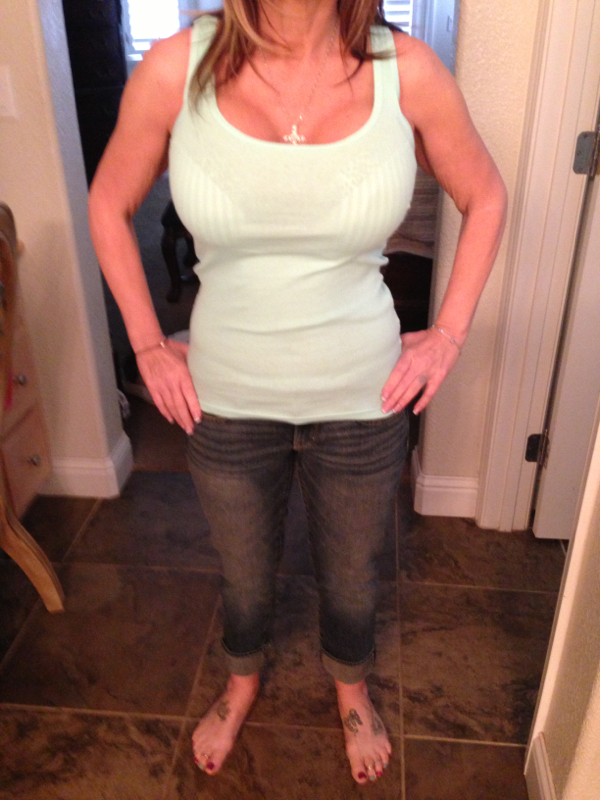
Tummy tuck breast lift and implants . Me at day 6

  • Replies 45
  • Views 8.4k
  • Created
  • Last Reply

Featured Replies

Heh.. His name? And cost? ;)

You look great!!!!

You look great! I'm going to have to have a TT in the near future too!

What would you like to know?

What did you pay 9100 for ? A tummy tuck . . . ? Or new implants ? Because you stated you had implants in 96 , they do have to be replaced every 10 years , so I'm confussed .? Did you pay 9100 for both ?

Sweet lawd Jesus!!! How big are those babies!

Lmbo!!!! I was thinking the same thing but wasn't gonna say it....but that is what I looked like before I gained the wgt.....Lil bitty with tig ole bitties.....lol. Hope I look that way again some day soon. OP you look great.

  • Author

Lol girls to funny I'm a 34 DD . The in implants size is oh my 745cc . They look really big but that was 6 days and very swollen .

Sweet lawd Jesus!!! How big are those babies!

LOL.. I was thinking, omg, that's what I paid $30,000 to get rid of! Now, the TT.. I'm all for, but my major flaws are my hips. Too each his own ;)

You look great.

Breast size is sort of hard to decide. I have an "athletic" build, meaning broad shoulder etc. I want implants but have been worried that going to big will make me look heavyset due to my build. I was looking at something in the 300 or so cc size.

Sorry I'm day 12 today.,

Who was your doctor?

Archived

This topic is now archived and is closed to further replies.

Account

Navigation

Search

Search

Configure browser push notifications

Chrome (Android)
  1. Tap the lock icon next to the address bar.
  2. Tap Permissions → Notifications.
  3. Adjust your preference.
Chrome (Desktop)
  1. Click the padlock icon in the address bar.
  2. Select Site settings.
  3. Find Notifications and adjust your preference.