




Skip to content
View in the app

A better way to browse. Learn more.

BariatricPal

A full-screen app on your home screen with push notifications, badges and more.

To install this app on iOS and iPadOS
  1. Tap the Share icon in Safari
  2. Scroll the menu and tap Add to Home Screen.
  3. Tap Add in the top-right corner.
To install this app on Android
  1. Tap the 3-dot menu (⋮) in the top-right corner of the browser.
  2. Tap Add to Home screen or Install app.
  3. Confirm by tapping Install.

Join BariatricPal free

  • Ask your own questions
  • Reply and follow topics
  • Message other members
  • No cost, no spam

Photos Of My Journey

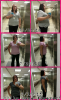
Here are some photos of my progress so far.....

From left to right, 0lbs, 15lbs, 30lbs, and today at 40lbs lighter! You'd think 40lbs would make more of a difference haha. I'll take it though. I won't miss this 40lbs!post-36207-13813670520451_thumb.png
post-34681-13813659920924_thumb.jpg

  • Replies 13
  • Views 1.8k
  • Created
  • Last Reply

Featured Replies

you are looking great! I can see a difference! Look at you.. you have a waist line already! Keep it up!!

You look great! There is a huge difference! How long ago was your surgery?

WTG looking good

  • Author

Thanks guys! Surgery was on 7/18, 7 wks ago

I agree you can definately see theq difference. 40 lbs you don"t have to lug around, way to go. Keel

Sorry keep up the good work!

You look awesome!

Your face!!! Your neck!!!! Great job girl!!! :)

WOW!!! u look great!

Congrats! That is awesome...I'm only 2 weeks post-op but I am excited to see where I am in another 5 weeks :). Keep up the good work!

  • 2 weeks later...

Looking good! :)

Good job....you look great! I can definitely see the difference!! Good luck on your continued journey!

You can see a huge difference! You have obviously lost quite a few inches in your hips/waist and it looks like some from your shoulders/upper body. You look great! If you look at the first to the last picture you have a line around your belly button in the first picture (I have this issue too) but by the last picture you definitely don't. What great progress, keep it up =)

Archived

This topic is now archived and is closed to further replies.

Account

Navigation

Search

Search

Configure browser push notifications

Chrome (Android)
  1. Tap the lock icon next to the address bar.
  2. Tap Permissions → Notifications.
  3. Adjust your preference.
Chrome (Desktop)
  1. Click the padlock icon in the address bar.
  2. Select Site settings.
  3. Find Notifications and adjust your preference.