Skip to content
View in the app

A better way to browse. Learn more.

BariatricPal

A full-screen app on your home screen with push notifications, badges and more.

To install this app on iOS and iPadOS
  1. Tap the Share icon in Safari
  2. Scroll the menu and tap Add to Home Screen.
  3. Tap Add in the top-right corner.
To install this app on Android
  1. Tap the 3-dot menu (⋮) in the top-right corner of the browser.
  2. Tap Add to Home screen or Install app.
  3. Confirm by tapping Install.
  • Appearance

Join BariatricPal free

  • Ask your own questions
  • Reply and follow topics
  • Message other members
  • No cost, no spam

December Sleeve

  • Replies 352
  • Views 20.5k
  • Created
  • Last Reply

Top Posters In This Topic

Most Popular Posts

  • aslcertified
    aslcertified

    I'm here !!! Doing pre op????????????

  • aslcertified
    aslcertified

    I'm scheduled dec 6 , 2016 Sent from my iPhone using the BariatricPal App

  • aslcertified
    aslcertified

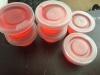
    I figured out a way to easily monitor my Protein intake without guessing if I am getting enough. The cups shown above holds 2 oz of liquid so I poured my Isopure of the day in each cup A full bo
Posted Images

Featured Replies

I can't believe I'm sitting at my desk in Iowa right now and tomorrow about this time, I'll be getting ready for my surgery day in Mexico! Yeah! So excited! Good luck to those of you today and tomorrow as I know your anxiously waiting... the time is almost now!

There is a December sleevers group under "groups " and you can access that if you are on a laptop or desktop computer.

Also, you can find a sleeve buddy that shares your December surgery date:

It's free!

Anyone here can post on it and view it so you can find an "accountabilaBuddy" or surgery twin.

You don't need to create an account to post.

Just use the URL to go to the calendar: https://teamup.com/ks5074f51794efefeb

*****Make sure you are looking at December 2016 and not November

Click on your date

Under Title: Put your MyBariatricPal user name

Under Who: Put your actual name or name you pref your friends to call you

Under Where: Put your location

Sent from my iPad using the BariatricPal App

I had my surgery around 11:00am.. it went perfect!! Very nauseous until they gave me meds... over all my experience has been great. I have done 4 laps around my floor.. pain in minimal. Don't be afraid guys. Definitely bring chap stick and mouth wash is your best friend:) good luck

Sent from my iPhone using the BariatricPal App

Having a real hard time sleeping... only sleeping 10'min at a time.. pain really not bad at all. Wilson06 hope you're doing well!!

Sent from my iPhone using the BariatricPal App

@@AlysonWonderland me too! As well as all the emotions. Good luck to us :)

Sent from my iPhone using the BariatricPal App

How are you feeling?

Sent from my iPhone using the BariatricPal App

attachicon.gif ImageUploadedByBariatricPal1481025378.600276.jpg

I'm here !!!

Doing pre op????????????

What all do you have to do for this pre op?

Sent from my SM-N920P using the BariatricPal App

How are you feeling!

Sent from my iPhone using the BariatricPal App

Everything went smoothly, I feel great today. Im surprised I did not have excruciating pain like I thought , I'm So happy. No pain just discomfort that can be tolerated.

Yesterday , Only thing Was nausea and my liquids would not digest felt like it was sitting in my throat and I wanted to chug it up but they say it could happen bec I had a hernia repair . so they suggested I crunch on ice.

So this morning , feeling a lot better. [emoji122]????[emoji122]????[emoji122]????

Join the conversation

You can post now and register later. If you have an account, sign in now to post with your account.

Guest
Reply to this topic...

Account

Navigation

Search

Search

Configure browser push notifications

Chrome (Android)
  1. Tap the lock icon next to the address bar.
  2. Tap Permissions → Notifications.
  3. Adjust your preference.
Chrome (Desktop)
  1. Click the padlock icon in the address bar.
  2. Select Site settings.
  3. Find Notifications and adjust your preference.