




Skip to content
View in the app

A better way to browse. Learn more.

BariatricPal

A full-screen app on your home screen with push notifications, badges and more.

To install this app on iOS and iPadOS
  1. Tap the Share icon in Safari
  2. Scroll the menu and tap Add to Home Screen.
  3. Tap Add in the top-right corner.
To install this app on Android
  1. Tap the 3-dot menu (⋮) in the top-right corner of the browser.
  2. Tap Add to Home screen or Install app.
  3. Confirm by tapping Install.

Join BariatricPal free

  • Ask your own questions
  • Reply and follow topics
  • Message other members
  • No cost, no spam

My 6 month surgiversary is here!

  • Popular Post

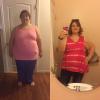
It's been 6 months since my RNY gave me my life and my happiness back! I've still got s loooong way to go, but I am on my way! HW:429lbs SW:386lbs current weight:278lbs. post-258512-14629387249588_thumb.jpg
  • Replies 13
  • Views 1.2k
  • Created
  • Last Reply

Featured Replies

Awesome job!

Wow- that's great! Congratulations

Sent from my iPhone using the BariatricPal App

Great Job

Keep it going

  • Author

Thank you everyone! I'm a work in progress, but if I can hit 220lbs by my 1yr mark, I'll be considering myself successful even though I'm not giving up til I've reached my goal weight. I'm already the lightest I've been since 1999 so it's exciting! I cannot wait to see what the next 6 months brings!

Edited by Sajijoma

  • Author

Way to go!!! I was at 355lbs in March last year and am at 225 today. Wait until you get in the low 200's - sooo much more energy!

Sent from my A846L using the BariatricPal App

I can't even imagine more energy than I have right now! I feel like I'm going to explode if I sit down now!

Great job!

You are really doing great.

Only 6 months? Wow. Excellent.

Archived

This topic is now archived and is closed to further replies.

Account

Navigation

Search

Search

Configure browser push notifications

Chrome (Android)
  1. Tap the lock icon next to the address bar.
  2. Tap Permissions → Notifications.
  3. Adjust your preference.
Chrome (Desktop)
  1. Click the padlock icon in the address bar.
  2. Select Site settings.
  3. Find Notifications and adjust your preference.