Skip to content
View in the app

A better way to browse. Learn more.

BariatricPal

A full-screen app on your home screen with push notifications, badges and more.

To install this app on iOS and iPadOS
  1. Tap the Share icon in Safari
  2. Scroll the menu and tap Add to Home Screen.
  3. Tap Add in the top-right corner.
To install this app on Android
  1. Tap the 3-dot menu (⋮) in the top-right corner of the browser.
  2. Tap Add to Home screen or Install app.
  3. Confirm by tapping Install.

Join BariatricPal free

  • Ask your own questions
  • Reply and follow topics
  • Message other members
  • No cost, no spam

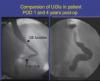
1 day vs 4 years comparsion (picture)

.....something interesting i found,hope you like it.

for those who don't know.....

left is a sleeve 1 day post-op and right is a sleeve 4 years post-op.

it is remarkable how much it has streched.

post-1167-13813655891969_thumb.jpg

  • Replies 20
  • Views 2.6k
  • Created
  • Last Reply

Top Posters In This Topic

Posted Images

Featured Replies

Thanks for sharing those images. I love to see the new Sleeve, 5 year Sleeve and normal stomach all side by side for comparison.

How much does a normal "no surgery" stomach hold?

I've heard a normal stomach can hold up to a gallon of food if pushed, but most people eat around a liter of food 32 ozs. So to have an 8-10 ounce stomach at maturity is still small.

Wow!!

Now that's AWESOME. Looking at all three pictures is enlightening. By one year post-op, my stomach better hold more volume than day 1 post-op. I can't imagine living on 1-2 tbsp of food for each meal forever (I remember those few weeks). At nearly 6 months post-op, this evening I ate 1/2 cup of chili for dinner and am stuffed. My husband easily put away 2 cups of chili, a bunch of Fritos and diet coke. Looking at these pictures, it is apparent as to why. I LOVE MY SLEEVE!!!

Join the conversation

You can post now and register later. If you have an account, sign in now to post with your account.

Guest
Reply to this topic...

Account

Navigation

Search

Search

Configure browser push notifications

Chrome (Android)
  1. Tap the lock icon next to the address bar.
  2. Tap Permissions → Notifications.
  3. Adjust your preference.
Chrome (Desktop)
  1. Click the padlock icon in the address bar.
  2. Select Site settings.
  3. Find Notifications and adjust your preference.