Skip to content
View in the app

A better way to browse. Learn more.

BariatricPal

A full-screen app on your home screen with push notifications, badges and more.

To install this app on iOS and iPadOS
  1. Tap the Share icon in Safari
  2. Scroll the menu and tap Add to Home Screen.
  3. Tap Add in the top-right corner.
To install this app on Android
  1. Tap the 3-dot menu (⋮) in the top-right corner of the browser.
  2. Tap Add to Home screen or Install app.
  3. Confirm by tapping Install.

Join BariatricPal free

  • Ask your own questions
  • Reply and follow topics
  • Message other members
  • No cost, no spam

LapBand Talk.com gets a "New " Face Lift..

What do you think about the NEW LOOK !

Do You Like IT ?

  • Replies 37
  • Views 3.9k
  • Created
  • Last Reply

Top Posters In This Topic

Most Popular Posts

  • SkinnyMiniMe
    SkinnyMiniMe

    I like it but It would be nice to have some form of explanation of what changed besides the look. I see that you can like a comment. Does it notify the comment writer? There is no more + or - feedb

Posted Images

Featured Replies

I like it but It would be nice to have some form of explanation of what changed besides the look. I see that you can like a comment. Does it notify the comment writer? There is no more + or - feedback? It took me a while to figure out that lol

Hmmmm I can't click on my ticker to update it like before. Wonder if it's me or something associated with the website change.

TBM

I am fairly new here and I have not be able to figure out how to make a ticker. Can someone please explain it to me, I woujdl certainly appreciae it.

  • Author
Hmmmm I can't click on my ticker to update it like before. Wonder if it's me or something associated with the website change. TBM

I can't get on either ? I guess your not alone.

They need to work the bugs out of that. That's for sure.

New look is ok. I really like that the message is included in email notifications. I don't like that you can't just put your curser on the post title and read it- you have to open it up.

It looks okay, but I have a hard time with change. I guess I am just getting old. It might take time to see if everybody likes it and by that time it will be changed again. Who is in charge of the changes made? Just when we figure out the last change, you changed it again, oh well, life is always changing right.

I have my first complaint. The default font size when replying is way too small. And it has to be manually changed with each reply to make it larger as far as I can see. Could the default size be made larger for those of us who have a hard time reading the really small print?

  • Author

I have my first complaint. The default font size when replying is way too small. And it has to be manually changed with each reply to make it larger as far as I can see. Could the default size be made larger for those of us who have a hard time reading the really small print?

Write to Alex.

I did about the Ticker problem, and it was fixed.

So see what he says...

I miss being able to preview a thread without having to open it. Now it only shows the origination date ) =

Don't like it.

I miss being able to preview a thread without having to open it. Now it only shows the origination date ) =

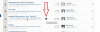
We do have this feature available, it's just slightly different and more efficient for browsers. We're looking on implementing preview of topics with just a mouse hover. If you move your mouse over the right side of each thread or topic, you'll see an arrow you can click on to preview. Here's an example screenshot:

before.JPG

and this is what happens when you click on the arrow:

Help Fig Out2.gif

preview2.png

preview.png

OK, thanks!

Every single thread I go to, I cannot read the posts at the bottom of the page. It's a bunch of scrambled up gibberish, and all of the lines run together. This just started when the site was re-done.

  • Author

I'm on threw Firefox, and it looks fine to me. Just what I see.

Contact Alex, and perhaps he can straighten it out for you.

I did for the Ticker, and it was fixed.

Join the conversation

You can post now and register later. If you have an account, sign in now to post with your account.

Guest
Reply to this topic...

Account

Navigation

Search

Search

Configure browser push notifications

Chrome (Android)
  1. Tap the lock icon next to the address bar.
  2. Tap Permissions → Notifications.
  3. Adjust your preference.
Chrome (Desktop)
  1. Click the padlock icon in the address bar.
  2. Select Site settings.
  3. Find Notifications and adjust your preference.