




Start here
Where are you in your journey?
Choose the path that fits today. We’ll take you to the most useful discussions.
- GLP-1 medication Zepbound, Wegovy, access, side effects, progress, and support.
- Before surgery Compare procedures, plan ahead, and get honest pre-op answers.
- Post-op Recovery, food stages, symptoms, and support.
- Long-term Regain, labs, habits, and life after the honeymoon.
- Revision Explore revision options, complications, and next steps.
For those eating under 1000 calories
- Replies 17
- Views 2.4k
- Created
- Last Reply
Top Posters In This Topic
-
ms.sss 3 posts
-
Cheeseburgh 3 posts
-
FluffyChix 2 posts
-
Briswife15 2 posts




Popular Days
Most Popular Posts
-
I eat breakfast closer to lunchtime. Usually 3oz lean deli ham with one slice of toasted ancient grain bread from Trader Joe’s. Total about 175 calories lunch examples: Jimmy John unwich turkey n
-
@FluffyChix what app are you using to track? I love the format and I LOVE that they have HEB items!
-
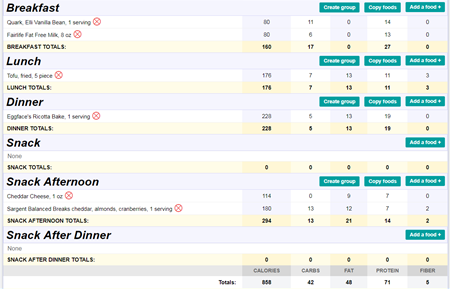
I'm aiming to be at 1000/day but more often than not, end up below it. Yesterday I got over 1000, but Saturday I did not, so here is what I ate that day. Note that "Breakfast" was at 12:30pm, and


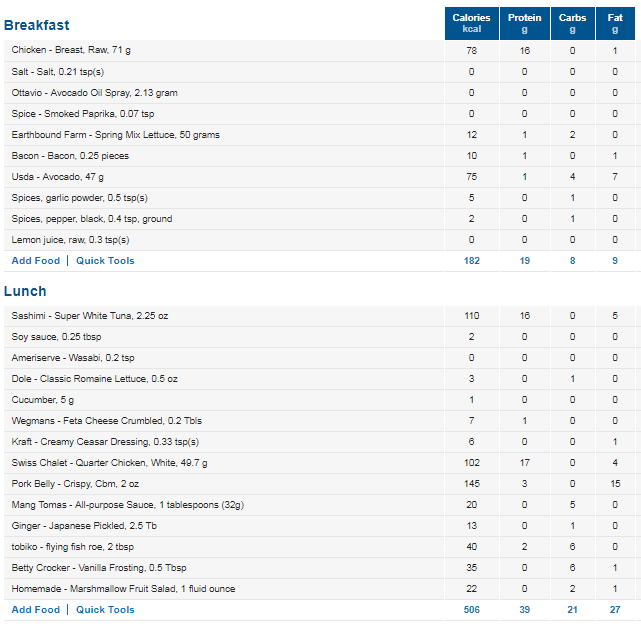
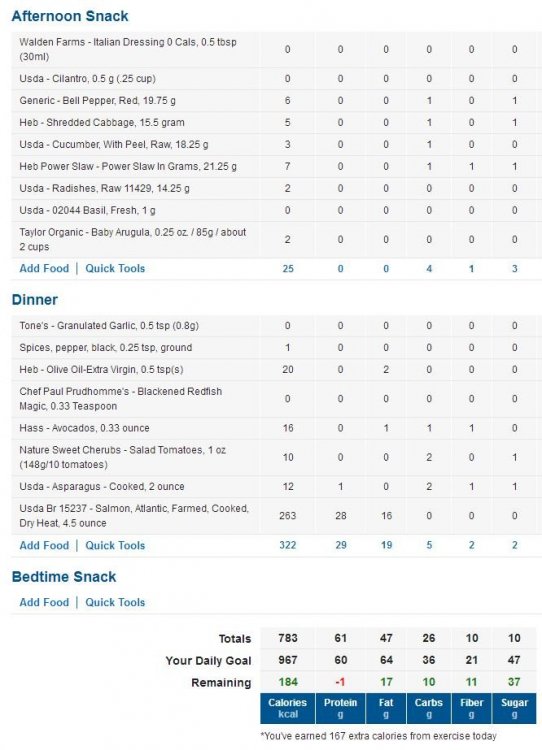
What does your typical day of eating look like for you.