




Start here
Where are you in your journey?
Choose the path that fits today. We’ll take you to the most useful discussions.
- GLP-1 medication Zepbound, Wegovy, access, side effects, progress, and support.
- Before surgery Compare procedures, plan ahead, and get honest pre-op answers.
- Post-op Recovery, food stages, symptoms, and support.
- Long-term Regain, labs, habits, and life after the honeymoon.
- Revision Explore revision options, complications, and next steps.
Family time/Xmas
- Replies 18
- Views 1.3k
- Created
- Last Reply
Top Posters In This Topic
-
LaNueva_Janie 8 posts
-
GreenTealael 1 post
-
Orchids&Dragons 1 post
-
Malcy 1 post




Popular Days
Most Popular Posts
-
No wonder they were blown away! You look fantastic, congrats!
-
Amazing ❤ Great post!!!
-
[emoji4] TY
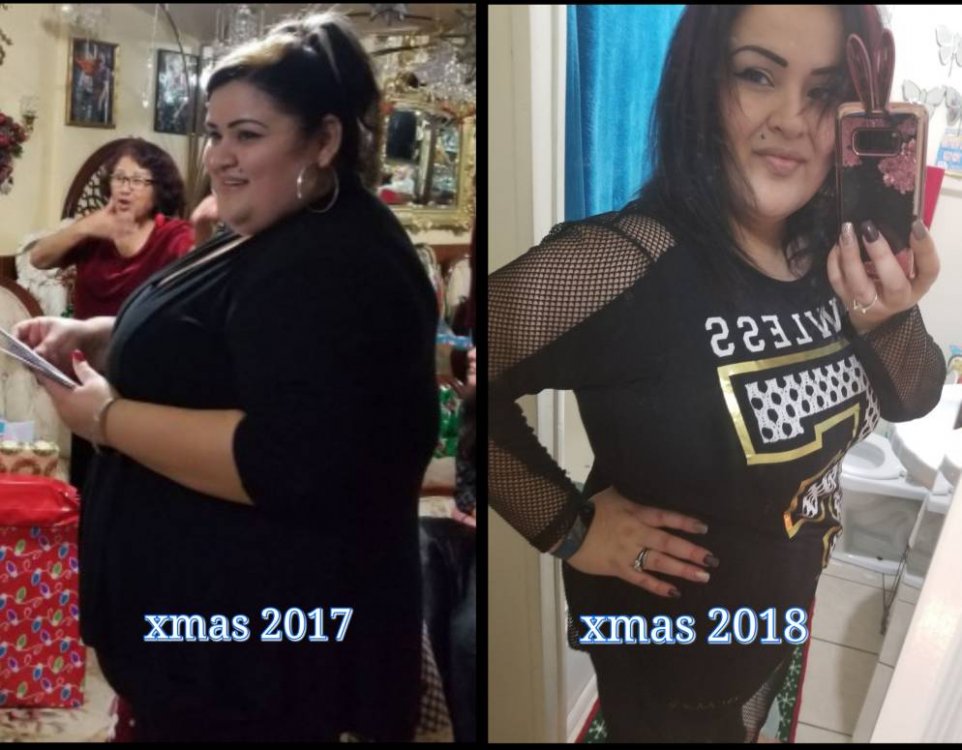
My family lives in Texas and i live in Maryland. Back in xmas 2017 i told them i was going to go through WLS. I had to explain what it was about, but i guess they thought.."she wont do it".. Mom,Dad, brother were scared , sister in law, husband and few others very supportive.
I just came to Texas yesterday for xmas and at 5 months post op my fam are blown away.
I showed them my xmas pic from 2017at 298lbs and they are shocked with the difference. I am currently at 224 lbs and I tell them im just getting started and i feel great.
Now about food..lol yes mom is cooking away..meal after meal but i am focused and i only serve my small portions and very selective on what i can eat, I talk more than i eat [emoji16] when before i was the quiet one eating while every one was talking and prob reaching out for a second plate.
[emoji319] [emoji318] [emoji320] Merry Christmas everyone lets stay focused. We can do this!