




Skip to content
View in the app

A better way to browse. Learn more.

BariatricPal

A full-screen app on your home screen with push notifications, badges and more.

To install this app on iOS and iPadOS
  1. Tap the Share icon in Safari
  2. Scroll the menu and tap Add to Home Screen.
  3. Tap Add in the top-right corner.
To install this app on Android
  1. Tap the 3-dot menu (⋮) in the top-right corner of the browser.
  2. Tap Add to Home screen or Install app.
  3. Confirm by tapping Install.

Join BariatricPal free

  • Ask your own questions
  • Reply and follow topics
  • Message other members
  • No cost, no spam

How do I quote only a section of someone's post and not the whole thing?

Thank you!

  • Replies 4
  • Views 2.1k
  • Created
  • Last Reply

Top Posters In This Topic

Most Popular Posts

  • I don't think it's possible or at least it's not done the same way. Whenever I press down and "hold" the text , I just get the android message of asking me if I want to copy the text.
Posted Images

Featured Replies

10 hours ago, Oct517 said:

Thank you!

IDK when they will answer maybe never...

On an Android in the web browser....

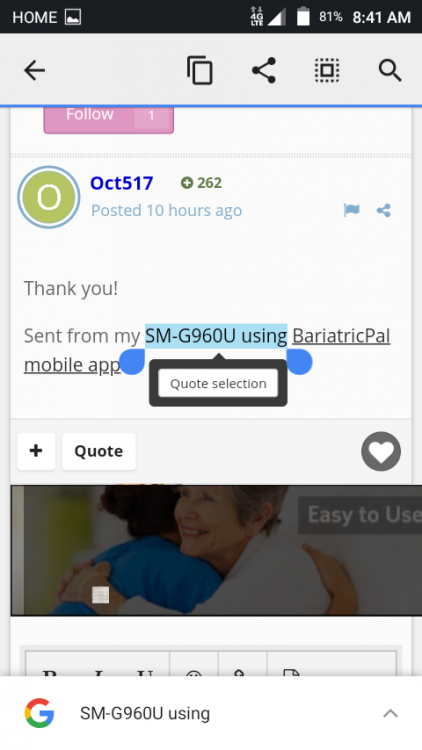
Tap and hold a selection of text for an extended period of time until a cursor box opens prompting to Quote selection of text. Extend cursur arrows to encompass all the text you want then tap on the Quote selection box.

Screenshot_2018-12-09-08-41-50.png

  • Author
IDK when they will answer maybe never...
On an Android in the web browser....
Tap and hold a selection of text for an extended period of time until a cursor box opens prompting to Quote selection of text. Extend cursur arrows to encompass all the text you want then tap on the Quote selection box.
Screenshot_2018-12-09-08-41-50.thumb.png.00c9576056aa2f82553e796a1c243adc.png
Do you know if it's possible to do within the android app?
6 minutes ago, Oct517 said:

Do you know if it's possible to do within the android app?

IDK

I no longer use the apps they had too many issues for me on both iOS and Android platforms.

Give it a try.

  • Author
IDK
I no longer use the apps they had too many issues for me on both iOS and Android platforms.
Give it a try.

I don't think it's possible or at least it's not done the same way. Whenever I press down and "hold" the text , I just get the android message of asking me if I want to copy the text.

Join the conversation

You can post now and register later. If you have an account, sign in now to post with your account.

Guest
Reply to this topic...

Account

Navigation

Search

Search

Configure browser push notifications

Chrome (Android)
  1. Tap the lock icon next to the address bar.
  2. Tap Permissions → Notifications.
  3. Adjust your preference.
Chrome (Desktop)
  1. Click the padlock icon in the address bar.
  2. Select Site settings.
  3. Find Notifications and adjust your preference.
