




Skip to content
View in the app

A better way to browse. Learn more.

BariatricPal

A full-screen app on your home screen with push notifications, badges and more.

To install this app on iOS and iPadOS
  1. Tap the Share icon in Safari
  2. Scroll the menu and tap Add to Home Screen.
  3. Tap Add in the top-right corner.
To install this app on Android
  1. Tap the 3-dot menu (⋮) in the top-right corner of the browser.
  2. Tap Add to Home screen or Install app.
  3. Confirm by tapping Install.

Join BariatricPal free

  • Ask your own questions
  • Reply and follow topics
  • Message other members
  • No cost, no spam

A little bit of FUN

  • Replies 8
  • Views 528
  • Created
  • Last Reply

Featured Replies

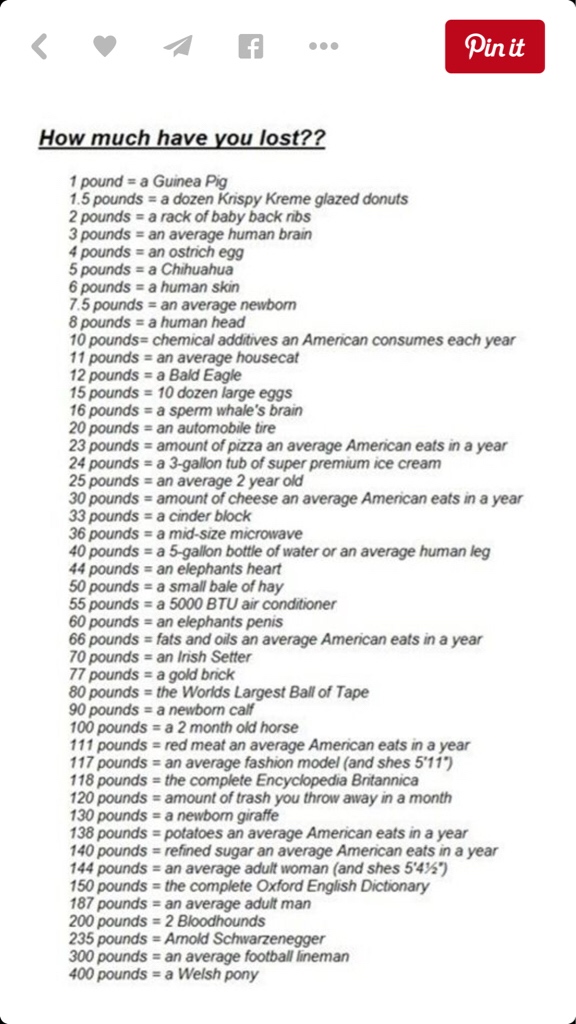
I'm between a cinder block and a microwave for weight lost after surgery.

And hovering around fats and oil an American consumes in a year for total weight lost since highest weight.

I'm the World's Largest Ball of Tape! Sounds like a sticky situation :P

Automobile tire here! Love this!

@@DONNK hahaha thanks!! I'm pleased with the penis for now, until I move on to the next accomplishment! ;)

Congrats to everyone for their fantastic progress thus far! =)

Edited by Nikikins

Archived

This topic is now archived and is closed to further replies.

Account

Navigation

Search

Search

Configure browser push notifications

Chrome (Android)
  1. Tap the lock icon next to the address bar.
  2. Tap Permissions → Notifications.
  3. Adjust your preference.
Chrome (Desktop)
  1. Click the padlock icon in the address bar.
  2. Select Site settings.
  3. Find Notifications and adjust your preference.