Skip to content
View in the app

A better way to browse. Learn more.

BariatricPal

A full-screen app on your home screen with push notifications, badges and more.

To install this app on iOS and iPadOS
  1. Tap the Share icon in Safari
  2. Scroll the menu and tap Add to Home Screen.
  3. Tap Add in the top-right corner.
To install this app on Android
  1. Tap the 3-dot menu (⋮) in the top-right corner of the browser.
  2. Tap Add to Home screen or Install app.
  3. Confirm by tapping Install.

Join BariatricPal free

  • Ask your own questions
  • Reply and follow topics
  • Message other members
  • No cost, no spam

The Sleeve works and going to Mexico was the best decision for me!

  • Popular Post

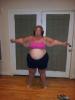
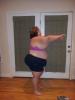
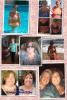
I'm almost 2 yrs post op and I went to Mexico for my VSG 8/31/13. I'm down 177lbs!!!!!! I'm maintaining :) I'm so happy I found this site which lead me to my doctor and many friends I've met along the way. VSG works!post-180464-0-52867500-1436783110_thumb.jpgpost-180464-0-81709900-1436783135_thumb.jpgpost-180464-0-99085500-1436783136_thumb.jpg
Edited by sherry24184

  • Replies 9
  • Views 852
  • Created
  • Last Reply

Featured Replies

you look great and you can tell by the BIG smile that you feel great. that is so encouraging for us newbies.

Looking awesome! Congrats on your hard work!

Wowza! Congratulations on taking the bull by the horns & opting to save your life! You seem so much happier. Great to see that.

Inspiring!!

WOW!! You worked your sleeve! You look amazing!

You look great!

You look great. Did you need any plastics?

I noticed we have the same surgeon. You look FANTASTIC -- I envy you the plastics but I know you were amazingly diligent getting ready for them. Thanks for updating!

Archived

This topic is now archived and is closed to further replies.

Account

Navigation

Search

Search

Configure browser push notifications

Chrome (Android)
  1. Tap the lock icon next to the address bar.
  2. Tap Permissions → Notifications.
  3. Adjust your preference.
Chrome (Desktop)
  1. Click the padlock icon in the address bar.
  2. Select Site settings.
  3. Find Notifications and adjust your preference.