Skip to content
View in the app

A better way to browse. Learn more.

BariatricPal

A full-screen app on your home screen with push notifications, badges and more.

To install this app on iOS and iPadOS
  1. Tap the Share icon in Safari
  2. Scroll the menu and tap Add to Home Screen.
  3. Tap Add in the top-right corner.
To install this app on Android
  1. Tap the 3-dot menu (⋮) in the top-right corner of the browser.
  2. Tap Add to Home screen or Install app.
  3. Confirm by tapping Install.

Join BariatricPal free

  • Ask your own questions
  • Reply and follow topics
  • Message other members
  • No cost, no spam

Where Are All The Gastric Bypass Surgery Progress Pictures?

I want to see updates and success stories lets make this Marvelous Mondays for all you loosers or should I say winners;-) I don't care if it's ten pounds lost I want to hear progress stories I could use the motivation to help me once I'm post op

  • Replies 12
  • Views 1.6k
  • Created
  • Last Reply

Top Posters In This Topic

Most Popular Posts

  • Don't have pics now but my open RNY was 10 years ago. I lost 160 lbs and have kept most of it off. It is a whole new life and I wish it for everyone who is brave enough to have the surgery.

  • ms.pinup85
    ms.pinup85

    How do you upload pictures

  • Alex Brecher
    Alex Brecher

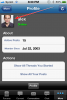
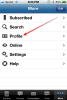
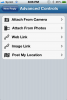
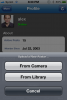
    You can post pics right from your app by clicking on the + sign right next to the "Send" button while writing a post: To change your profile picture: 1) Go to your profile tab: 2) Click on t

Posted Images

Featured Replies

I post updates all the time on the progress pics thread but I'm also anxious to see others progress too!!!

New to this app on my phone....where do we go to upload progress pics? I love that idea!

Don't have pics now but my open RNY was 10 years ago. I lost 160 lbs and have kept most of it off. It is a whole new life and I wish it for everyone who is brave enough to have the surgery.

  • Author
New to this app on my phone....where do we go to upload progress pics? I love that idea!

I'm not sure how I will ask someone who did it already

  • Author
Don't have pics now but my open RNY was 10 years ago. I lost 160 lbs and have kept most of it off. It is a whole new life and I wish it for everyone who is brave enough to have the surgery.

Wow that's lovely especially since your lost is long term

You can post pics right from your app by clicking on the + sign right next to the "Send" button while writing a post:

To change your profile picture:

1) Go to your profile tab:

2) Click on the picture icon:

1.png

photo 2.PNG

profile.png

click on photo.png

photo 5.PNG

Hmmm that's strange I don't have that. Not sure how to put up my profile pic either :(

I updated my post above with info on how to add or edit your profile pic right from our app.

What device do you have our app installed on please ? Does it have a camera ?

You can update all this info plus a lot more if you're logged in from a desktop computer at http://www.RNYTalk.com .

We're working on the next generation of our mobile apps. They should be a lot easier to use with many more useful features.

going to have to try this app thing :)

Join the conversation

You can post now and register later. If you have an account, sign in now to post with your account.

Guest
Reply to this topic...

Account

Navigation

Search

Search

Configure browser push notifications

Chrome (Android)
  1. Tap the lock icon next to the address bar.
  2. Tap Permissions → Notifications.
  3. Adjust your preference.
Chrome (Desktop)
  1. Click the padlock icon in the address bar.
  2. Select Site settings.
  3. Find Notifications and adjust your preference.