




Start here
Where are you in your journey?
Choose the path that fits today. We’ll take you to the most useful discussions.
- GLP-1 medication Zepbound, Wegovy, access, side effects, progress, and support.
- Before surgery Compare procedures, plan ahead, and get honest pre-op answers.
- Post-op Recovery, food stages, symptoms, and support.
- Long-term Regain, labs, habits, and life after the honeymoon.
- Revision Explore revision options, complications, and next steps.
Pictures! I Posted The Other Day But Now I Have Pictures!
- Replies 35
- Views 2.3k
- Created
- Last Reply
Top Posters In This Topic
-
brittneyly 17 posts
-
Chuckles 1 post
-
workingonme 1 post



Popular Days
Most Popular Posts
-
Get your eyes checked you are beautiful and there is a big difference Sent from my SPH-D700 using VST
-
Wow! That is amazing! So happy for you
-
Your looking great! Pics don't lie....




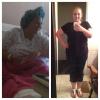
So I posted a few days ago about how well I feel like I have been doing but I wanted to put up some pictures and get some opinions. I feel like something is wrong with my eyes. I can definately tell with my scale and the way I feel how much weight I have lost but when I look at pictures I dont feel like I see a big difference. Maybe I just chose the wrong pictures to compare or maybe mI just crazy!!lol!! Starting weight 257 Current weight as of today 196. If you cant see them please let me know!