




Start here
Where are you in your journey?
Choose the path that fits today. We’ll take you to the most useful discussions.
- GLP-1 medication Zepbound, Wegovy, access, side effects, progress, and support.
- Before surgery Compare procedures, plan ahead, and get honest pre-op answers.
- Post-op Recovery, food stages, symptoms, and support.
- Long-term Regain, labs, habits, and life after the honeymoon.
- Revision Explore revision options, complications, and next steps.
Before And During Pics (13 Weeks Out)
- Replies 20
- Views 2.4k
- Created
- Last Reply
Top Posters In This Topic
-
SexySlim 4 posts
-
chitowngirl 1 post
-
Looking Ahead 1 post
-
Minckle 1 post




Popular Days
Most Popular Posts
-
You are halfway there! You look so good now. At 200 you should look F-A-B-U-L-O-U-S baby!! K

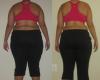
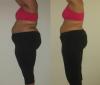
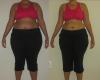
Hi losers! I took some during pics this morning. The before pics are 2 weeks before my surgery, right before I started the pre-op diet. The current pics are 13 weeks out (as of last Wednesday). Before I was 288.0 lbs and now 241.0 lbs (47 lost). I was in a size 20W (very fitted) and now I can wear a 18 Regular. I just want to be a size 14, I don't ever remember being a 14 in my life. I'm a tall amazon queen, so I will see how 200 lbs looks on me first and then assess from there. Happy losing!