Skip to content
View in the app

A better way to browse. Learn more.

BariatricPal

A full-screen app on your home screen with push notifications, badges and more.

To install this app on iOS and iPadOS
  1. Tap the Share icon in Safari
  2. Scroll the menu and tap Add to Home Screen.
  3. Tap Add in the top-right corner.
To install this app on Android
  1. Tap the 3-dot menu (⋮) in the top-right corner of the browser.
  2. Tap Add to Home screen or Install app.
  3. Confirm by tapping Install.

Join BariatricPal free

  • Ask your own questions
  • Reply and follow topics
  • Message other members
  • No cost, no spam

From Morbidly Obese To Overweight!

  • Popular Post

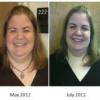
Hey everyone...I weighed in today and for the first time my lovely Wii told me I am overweight! hehe. When I started this journey I was morbidly obese....and felt like death was chasing me. Now I am just overweight and I can see the light at the end of the tunnel...and it isnt death...lol

So happy to just be overweight now! cant wait till I am normal weight! :)

  • Replies 21
  • Views 3.2k
  • Created
  • Last Reply

Top Posters In This Topic

Most Popular Posts

  • Jeni Martin
    Jeni Martin

    where is the like button???

  • Congrats! That Wii can really hurt your feelings. Even tho it's telling the truth. Glad to see it can be encouraging too.???? Sent from my iPad using VST

Featured Replies

  • Author

Oh girl, I have all of the "Just Dance" games and I LOVE them. I haven't played in awhile now because of my knee. I am having surgery on it tomorrow though, so I am hoping to get back with it soon. It'll whoop that bootay

Sent from my iPad using VST

well i hope the surgery goes well!

  • Author

Congrats on your progress! I am right behind you. Only .2% to being obese.

Sent from my iPad using VST

isnt it great!

yay congrats

A big congratulations to you Sassy!!

  • Author

A big congratulations to you Sassy!!

thank you cookie! :)

Join the conversation

You can post now and register later. If you have an account, sign in now to post with your account.

Guest
Reply to this topic...

Account

Navigation

Search

Search

Configure browser push notifications

Chrome (Android)
  1. Tap the lock icon next to the address bar.
  2. Tap Permissions → Notifications.
  3. Adjust your preference.
Chrome (Desktop)
  1. Click the padlock icon in the address bar.
  2. Select Site settings.
  3. Find Notifications and adjust your preference.