




Start here
Where are you in your journey?
Choose the path that fits today. We’ll take you to the most useful discussions.
- GLP-1 medication Zepbound, Wegovy, access, side effects, progress, and support.
- Before surgery Compare procedures, plan ahead, and get honest pre-op answers.
- Post-op Recovery, food stages, symptoms, and support.
- Long-term Regain, labs, habits, and life after the honeymoon.
- Revision Explore revision options, complications, and next steps.
10 Lbs Till Onederland!
- Replies 7
- Views 855
- Created
- Last Reply
Top Posters In This Topic
-
DallasMomofTwins 1 post
-
Liberated Sleeve 1 post
-
2ndtimesacharm 1 post
-
Swimmer 1 post

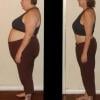


I hit 210 today...woo hoo! I am so excited to be so close to onederland, I can wait!!! I am down 30 lbs since surgery (Feb 9th) and 45 since the first of the year. I am down two pants sizes and to xl shirts...no more plus sizes! I just wanted to thank everyone in this forum for all your posts, they have helped me tremendously!