




Start here
Where are you in your journey?
Choose the path that fits today. We’ll take you to the most useful discussions.
- GLP-1 medication Zepbound, Wegovy, access, side effects, progress, and support.
- Before surgery Compare procedures, plan ahead, and get honest pre-op answers.
- Post-op Recovery, food stages, symptoms, and support.
- Long-term Regain, labs, habits, and life after the honeymoon.
- Revision Explore revision options, complications, and next steps.
3 months post op down 55lbs pic closing in on onderland
- Replies 5
- Views 985
- Created
- Last Reply
Top Posters In This Topic
-
swizzly 1 post
-
sunnyd 1 post
-
kids05 1 post
-
Caliblonde 1 post



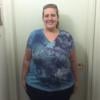

Hi all I have read/lurked on these boards since Jan. I was sleeved in KC 3/9/11 by Dr. Hoehn. I have/had PCOS. My starting weight was 264. I lost 14lbs during my 2 week pre-op diet. So my starting weight day if surgery 250. Today I am 209. I am closing in on onederland.
I am down from 14 meds a day to 2. My cholesterol week of surgery was 232 LDL 155 Triglycerides 145
As of 4/28 my Cholesterol was 180 LDL 108 Trigyclerides 111 and HDL went up 5 points. All my labs looked good.
I am anxiously awaiting 195 for 3 days. Then I will count myself in onerland! (allotting for scale differences.)
Anyway I don't have really full body shots but you can tell in my face obviously. The middle pic is from today the other 2 were from the beginnng of feb.I went from a tight 22 to a comfortable to loose 18.
Thanks for all the support (even though I have never posted) You all are a wealth of information.
~Jess
35 yrs 5 ft 7 in tall
Surgery 3/9/11
Mom of a 10yr old, 6yr old and 4yr old