Skip to content
View in the app

A better way to browse. Learn more.

BariatricPal

A full-screen app on your home screen with push notifications, badges and more.

To install this app on iOS and iPadOS
  1. Tap the Share icon in Safari
  2. Scroll the menu and tap Add to Home Screen.
  3. Tap Add in the top-right corner.
To install this app on Android
  1. Tap the 3-dot menu (⋮) in the top-right corner of the browser.
  2. Tap Add to Home screen or Install app.
  3. Confirm by tapping Install.
  • Appearance

Join BariatricPal free

  • Ask your own questions
  • Reply and follow topics
  • Message other members
  • No cost, no spam

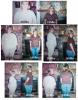
I'm Offically 100 pounds down!!!!

  • Replies 74
  • Views 4.6k
  • Created
  • Last Reply

Top Posters In This Topic

Posted Images

Featured Replies

  • Author
Jamie darlin', your boobs are missing. :biggrin1:

A BIG high-five to you, cause Girl, you look AWESOME!!!!:clap2:

Paula you always make me laugh.... My hubby says the same thing... I told him that was okay he could buy me a new set of ninnies like HE'S NEVER SEEN BEFORE!!!! LOL!!! Want a tummy tuck too !!!

  • Author
Absolutely Terrific! You are beautiful and an inspiration to me! How did you keep that motivation up? Give me some tips girl you look awesome!

Angie

Hey Angie~ I really don't have any tips except for follow your bandster rules and the main thing is that even when I'm not being a very good bandster my band is always there to remind me to be good.... when I decide to cooperate with it!!! Good luck to you!!! excersice and drink your Water.... never drink with your meals and you will continue to do great.. Congrats on your success!!!

Join the conversation

You can post now and register later. If you have an account, sign in now to post with your account.

Guest
Reply to this topic...

Account

Navigation

Search

Search

Configure browser push notifications

Chrome (Android)
  1. Tap the lock icon next to the address bar.
  2. Tap Permissions → Notifications.
  3. Adjust your preference.
Chrome (Desktop)
  1. Click the padlock icon in the address bar.
  2. Select Site settings.
  3. Find Notifications and adjust your preference.