Skip to content
View in the app

A better way to browse. Learn more.

BariatricPal

A full-screen app on your home screen with push notifications, badges and more.

To install this app on iOS and iPadOS
  1. Tap the Share icon in Safari
  2. Scroll the menu and tap Add to Home Screen.
  3. Tap Add in the top-right corner.
To install this app on Android
  1. Tap the 3-dot menu (⋮) in the top-right corner of the browser.
  2. Tap Add to Home screen or Install app.
  3. Confirm by tapping Install.

Join BariatricPal free

  • Ask your own questions
  • Reply and follow topics
  • Message other members
  • No cost, no spam

My 2 year Bandiversary!!

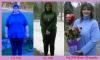
Hey ya'll, I just have a PRAISE! Today is the 2 year anniversary of my lapband surgery and I just had to share some before/after pics.

God has been so good to me and allowed me to lose 140 pounds to date.:) I still have a ways to go, but He will help me I just know it! I have to give all the credit to HIM because without HIM I could do nothing.

See ya! Have a great day!

post-204308-13813132959569_thumb.jpg

  • Replies 40
  • Views 3.3k
  • Created
  • Last Reply

Top Posters In This Topic

Posted Images

Featured Replies

WoW! Congratulations... you look fabulous! Happy Bandiversary!

Happy Anniversary! You are looking fabulous!

I am not sure about others but these before and after pictures get me all emotional and teary eyed. I have never been happier for folks I have never met.

Hugs

Congrats!!! Way to go, you look great.

Happy Band Day to you,

Happy Band Day to you,

Happy Band Day Dear Ethel,

you look awesome, WOO HOO!!!

Wow, you are an inspiration to us alll!!!!

~cheri

Wow!! You look fabulous. I want you to know that you are my personal inspiration. I am shaped so much like you were - and my initial starting weight was similar.

Seeing your photos really gets me inspired!! If you can look that good only two years down the road, so can I!

Thanks, Brenda! I hope to follow in your weightloss footsteps, soon.

CONGRATS!

:]

In honor of your 2 year Bandiversary, you need two things

1) A New, more fitting screen name!

2) A new avatar showing off that cool new haircut!

Congratulations!!

Join the conversation

You can post now and register later. If you have an account, sign in now to post with your account.

Guest
Reply to this topic...

Account

Navigation

Search

Search

Configure browser push notifications

Chrome (Android)
  1. Tap the lock icon next to the address bar.
  2. Tap Permissions → Notifications.
  3. Adjust your preference.
Chrome (Desktop)
  1. Click the padlock icon in the address bar.
  2. Select Site settings.
  3. Find Notifications and adjust your preference.