live2canoe
LAP-BAND Patients
-
Joined
-
Last visited
-
-
First of all congratulations on the weight loss you did achieve - that is no small matter. It has to be very discouraging to have gained a good portion of it back. I never lose did the you were able to, and I gained some of mine back too. Do you still feel restriction? If not, maybe all you need is a simple fill. If you do feel restriction, but have gained the weight back due to eating 'band friendly' but high fat, high sugar foods, maybe a plan like Weight Watchers would help you get back on track. All I know is that you've already made huge strides - please don't beat yourself up.
-
Please write back soon and let us know what the Neuro Guru had to say. We're all pulling for you!
-
Oh My Word!!! I have no idea how you did that! That is SO AWESOME! Good for you. Being proud of yourself is ever so much more satisfying than a Turtle Sundae.
-
That's great!!! She is very lucky to have such an informed and supportive mom. Please continue to let us know how she's doing. Good Luck
-
Hey Penni - I don't know how you did it with 4 kids. It's just me and my son since he was a baby. It was hard when he was young, but he'll graduate next year, and I'll only be 43! Let the good times roll, baby!!!
-
My fills are done by a physician's assistant (PA). She NEVER misses!
-
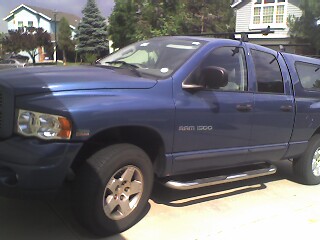
AS you can see from my screen name, I do a lot of river trips. This bad boy carries two very large canoes and all the gear I need for a long weekend. It's also a great shuttle vehicle. At the beginning of a river trip, after we unload all of our stuff at the 'put-in', or where we begin, everyone drives their car to the 'take-out', where we are going to end up after 3 days of paddling down the river. Everyone leaves their car at the take out, and we all pile into one 'shuttle' vehicle, for the ride back up to where we left all our stuff - hence the need for the quad cab! And yeah, Baby - it's got a Hemi!
-
Too cool!! My son is going to be a Senior this year. I can hardly believe it. We just had his Senior pictures taken. If I could figure out how to get them downloaded off the DVD they gave me, I could post some here. Congratulations, Penni!! You have every reason to be proud!
-
Hi Sarah - I'm just a couple of months away from my two year mark. The most I've lost is 40 pounds, so you're ahead of me! And truth be told, I've put back on at least 5 of those pounds. I've steered clear of the scale for quite a while now, since it serves no purpose except to depress me. I'm not doing the things I really need to do to lose weight. My band keeps me from totally going backwards, but she and I are definitely at a standstill. Congratulations on your upcoming wedding! Concentrate on that, instead of the silly scale. It's much more fun and has more meaning, anyway. Good Luck!
-
Welcome to LBT. There are many bandsters on this board who hail from the Great State of Texas. AS far as the hints for before and after surgery, all I can say is read read read. Do a search on LBT and many many threads will pop up, all with great information on them. Avail yourself to the resources here. If you have a specific question, go to one of the different sections on the board (general discussion, support, etc.) and post a question there.
-
Well - like I said, we still don't know if you're close to goal weight or not. But, to answer your second question - they leave the lapband in when they do a tummy tuck.
-
Then you should qualify for lapband surgery.
-
I still love sushi, but - Beware the seaweed wrapper. One of the worst pb's ever!
-
Co-morbidities are conditions that are weight related that put your health at risk. Some common weight related co-morbidities are diabetes, high blood pressure, heart disease. Back and joint problems are considered co-morbidities,too. Most doctors will not perform lap band surgery if your bmi is below 40. There is an exception if your bmi is above 35 and you have two or more co-morbidities.
-
Good for you. We have several bandsters from Down Under here on LBT. Welcome and congratulations on your new life.