Skip to content
View in the app

A better way to browse. Learn more.

BariatricPal

A full-screen app on your home screen with push notifications, badges and more.

To install this app on iOS and iPadOS
  1. Tap the Share icon in Safari
  2. Scroll the menu and tap Add to Home Screen.
  3. Tap Add in the top-right corner.
To install this app on Android
  1. Tap the 3-dot menu (⋮) in the top-right corner of the browser.
  2. Tap Add to Home screen or Install app.
  3. Confirm by tapping Install.

Join BariatricPal free

  • Ask your own questions
  • Reply and follow topics
  • Message other members
  • No cost, no spam

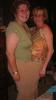
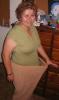
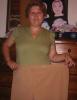
Do you think my pants are too big?

The other night when we were going out I was looking for something to wear and found a pair of pants that I hadnt worn since the week before banding and they were tight....sooooo these pics are of me with those pants on....it made my day!!!! BTW the one with 2 ppl is my mum and I in the pants together.

I love my band!!!! :clap2: :clap2: :clap2:

post-204619-1381313266399_thumb.jpg

post-204619-13813132664323_thumb.jpg

post-204619-13813132664648_thumb.jpg

  • Replies 28
  • Views 2.4k
  • Created
  • Last Reply

Top Posters In This Topic

Posted Images

Featured Replies

  • Author

With all these suggestions to change my name I have been trying to think of sometihng more appropriate and I cam up with -

Saggybellykellie haha what do you think? It is certainly more appropriate :)

Awesome job! You look absolutely wonderful. Thanks for sharing the pictures. Such a huge difference in your face too. Before long it will be ittybittykelly.

WOW!!! Congrats. You look great, and what an accomplishment.

How bout OZKellie

down under is what I think when I read your stuff

nomorebellykelly...that's pretty good

Wow! Now that's inspiring! Congratulations!

Thank you for the extremely inspirational pictures!!! You look fantastic!

Join the conversation

You can post now and register later. If you have an account, sign in now to post with your account.

Guest
Reply to this topic...

Account

Navigation

Search

Search

Configure browser push notifications

Chrome (Android)
  1. Tap the lock icon next to the address bar.
  2. Tap Permissions → Notifications.
  3. Adjust your preference.
Chrome (Desktop)
  1. Click the padlock icon in the address bar.
  2. Select Site settings.
  3. Find Notifications and adjust your preference.