




Skip to content
View in the app

A better way to browse. Learn more.

BariatricPal

A full-screen app on your home screen with push notifications, badges and more.

To install this app on iOS and iPadOS
  1. Tap the Share icon in Safari
  2. Scroll the menu and tap Add to Home Screen.
  3. Tap Add in the top-right corner.
To install this app on Android
  1. Tap the 3-dot menu (⋮) in the top-right corner of the browser.
  2. Tap Add to Home screen or Install app.
  3. Confirm by tapping Install.

Join BariatricPal free

  • Ask your own questions
  • Reply and follow topics
  • Message other members
  • No cost, no spam

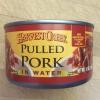
Costco find-pulled pork!

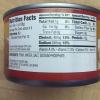
So good! 2oz has 12g protein, 1g fat and 0 carbs. Just pork, water, salt and sodium phosphate. Kinda high in sodium for those of you watching that (240g) but it's one of my new favorites! post-194772-14496002911779_thumb.jpgpost-194772-1449600303357_thumb.jpg
  • Replies 5
  • Views 1.4k
  • Created
  • Last Reply

Featured Replies

Do you eat it out of the can? Cold? Warm? Looks yummy!

  • Author

I guess you could, but no I ate it warmed. And put it on sourdough rolls for hubby and the kids. Served with Cole slaw

I bought some a couple months ago. For some reason it tasted better as a sample. I've opened 2 cans over the past 2 months...and it's very "meh". I can eat anything....and I mean ANYTHING...so it's not an issue of tolerance of the food. If you buy this...be very creative with the flavors you add...because I never have finished a whole serving of it....lol It is a great protein source...but it definitely needs something on it!!

  • 3 weeks later...

costco also has a smoked pulled pork in the meat section that is delicious. It has a yummy smoky flavor. No sauce added so it was a great choice to keep carbs down.

Archived

This topic is now archived and is closed to further replies.

Account

Navigation

Search

Search

Configure browser push notifications

Chrome (Android)
  1. Tap the lock icon next to the address bar.
  2. Tap Permissions → Notifications.
  3. Adjust your preference.
Chrome (Desktop)
  1. Click the padlock icon in the address bar.
  2. Select Site settings.
  3. Find Notifications and adjust your preference.