




Skip to content
View in the app

A better way to browse. Learn more.

BariatricPal

A full-screen app on your home screen with push notifications, badges and more.

To install this app on iOS and iPadOS
  1. Tap the Share icon in Safari
  2. Scroll the menu and tap Add to Home Screen.
  3. Tap Add in the top-right corner.
To install this app on Android
  1. Tap the 3-dot menu (⋮) in the top-right corner of the browser.
  2. Tap Add to Home screen or Install app.
  3. Confirm by tapping Install.

Join BariatricPal free

  • Ask your own questions
  • Reply and follow topics
  • Message other members
  • No cost, no spam

For Ken S - Still Have Major Problems With The Boards

I'm still having problems as we discussed a few days ago. On threads that are short, I can usually see the reply box, although the ads are still stacked on top of it. However, if the thread is longer than 3 replies, I cannot get a reply box and I still have the ads stacked up at the bottom. Yesterday I couldn't reply at all and this morning, it's intermittent again. Help?

  • Replies 10
  • Views 1.6k
  • Created
  • Last Reply

Top Posters In This Topic

Most Popular Posts

  • For those of you who are still having this issue - I've updated the code, but you also have to make a very simple change on your end. If you're using IE9, or possibly even IE8 - you may have this is
Posted Images

Featured Replies

I having the same issue. I thought it was the computer at work, however it does the same thing at home.

My biggest issue is that this website won't stop emailing me!

  • Author

aLEX, i'M ON ie 9.0.5, AND I've done everything I can come up with to fix this. I've removed my signature, added it back, deleted cookies, history, shut down and restarted my computer, logged out, logged in, tried to post as a guest. Nothing I can do seems to be working and VST is the only website I'm having problems accessing.

  • Author

And I can't upload a picture anywhere through the boards to show you what this looks like. I did email some to Ken the other night. :)

  • Author

Wow!! Ken, you are the BOMB!!!!!!!!!!!!! :) I just fixed it with one click of the button!! :)

For those of you who are still having this issue - I've updated the code, but you also have to make a very simple change on your end.

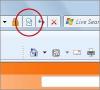
If you're using IE9, or possibly even IE8 - you may have this issue. There is a little "broken page" icon in the top of your browser window to the right of your Address Bar. Please click this icon and it will remove you from compatibility mode and refresh the page. You should now be able to view the site properly.

Thanks,

Ken

For those of you who are still having this issue - I've updated the code, but you also have to make a very simple change on your end.

If you're using IE9, or possibly even IE8 - you may have this issue. There is a little "broken page" icon in the top of your browser window to the right of your Address Bar. Please click this icon and it will remove you from compatibility mode and refresh the page. You should now be able to view the site properly.

Thanks,

Ken

Can you please tell me what the "broken page" icon looks like... I am not sure and having same issues. ty

Hello, the broken page icon looks like a broken page. Such as the ones represented here

The icon looks quite similar throughout all versions of IE.

Please let me know if you're able to locate the Compatibility Mode "Broken Page" icon.

Thanks,

Ken

feat_200_compatview.jpg

Join the conversation

You can post now and register later. If you have an account, sign in now to post with your account.

Guest
Reply to this topic...

Account

Navigation

Search

Search

Configure browser push notifications

Chrome (Android)
  1. Tap the lock icon next to the address bar.
  2. Tap Permissions → Notifications.
  3. Adjust your preference.
Chrome (Desktop)
  1. Click the padlock icon in the address bar.
  2. Select Site settings.
  3. Find Notifications and adjust your preference.


