Skip to content
View in the app

A better way to browse. Learn more.

BariatricPal

A full-screen app on your home screen with push notifications, badges and more.

To install this app on iOS and iPadOS
  1. Tap the Share icon in Safari
  2. Scroll the menu and tap Add to Home Screen.
  3. Tap Add in the top-right corner.
To install this app on Android
  1. Tap the 3-dot menu (⋮) in the top-right corner of the browser.
  2. Tap Add to Home screen or Install app.
  3. Confirm by tapping Install.

Join BariatricPal free

  • Ask your own questions
  • Reply and follow topics
  • Message other members
  • No cost, no spam

Presenting Me - 40lbs Lighther (Pics)

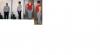
Well this is my first time at posting pics so here goes nothing!

post-203875-13813131227516_thumb.jpg

  • Replies 14
  • Views 1.8k
  • Created
  • Last Reply

Top Posters In This Topic

Posted Images

Featured Replies

Reading through posts, viewing the pics...I just wanted to say to EVERYONE what an inspiration each and everyone one of you are. As for me, still 'searching for surgeon' (SFS) *laughs*...however, I am excited about a seminar I am attending this Wed. night. Whaoohoo, go me!

Jem

Hi Jennye - apologies for being late with my congrats but I've been away - so thrilled to come back and see photos of your brilliant progress at last! You look fab - your face looks completely different! And your hourglass figure is really apparent now! You should be so proud - well done!

:banana :banana :banana :banana :banana

  • Author

You are all so kind! I'm so happy to be part of this little group! Looks like I started a trend with posting photos...it's amazing to see how well everyone is doing! I just had my third fill today to 3.0cc's...ahhh...so this is what restriction feels like!

Join the conversation

You can post now and register later. If you have an account, sign in now to post with your account.

Guest
Reply to this topic...

Account

Navigation

Search

Search

Configure browser push notifications

Chrome (Android)
  1. Tap the lock icon next to the address bar.
  2. Tap Permissions → Notifications.
  3. Adjust your preference.
Chrome (Desktop)
  1. Click the padlock icon in the address bar.
  2. Select Site settings.
  3. Find Notifications and adjust your preference.