Skip to content
View in the app

A better way to browse. Learn more.

BariatricPal

A full-screen app on your home screen with push notifications, badges and more.

To install this app on iOS and iPadOS
  1. Tap the Share icon in Safari
  2. Scroll the menu and tap Add to Home Screen.
  3. Tap Add in the top-right corner.
To install this app on Android
  1. Tap the 3-dot menu (⋮) in the top-right corner of the browser.
  2. Tap Add to Home screen or Install app.
  3. Confirm by tapping Install.

Join BariatricPal free

  • Ask your own questions
  • Reply and follow topics
  • Message other members
  • No cost, no spam

Labor Day Wt loss Challenge- Sept. 7th

OK, back by popular demand let start our goals for the next challenge. I totally bombed the last one so I am hoping this one works better for me. CapitolChick is going to set up the spreadsheet for us!! YAY!

  • Replies 175
  • Views 12.2k
  • Created
  • Last Reply

Top Posters In This Topic

Posted Images

Featured Replies

I"m so frustrated, I've been on a plateau and have only lost one pound in the last three weeks. I"m eating between 1100-1500 cals a day and exercise for 40 minutes 5-6 times a week...

Woo Hoo!!! I lost another 3 pds since I posted last (well, 2.9 but who'd counting!!!) Only 4.2 to goal. I'm hoping to make that as I missed my July 4th goal.

Ewiedbingcott, Congrats!!! You are doing great!

i have been eating carbs esp cereal and Cheetos for the last week :) . Had DD hide the rest I am staying out of the pantry only unless absolutely necessary. Have lost 10 # since my last fill and been wavering over the same few #s for over 2 weeks. :blink: Have another fill scheduled Wed. Maybe My giving up flour (and Cheetos) with the fill, will help

down another 4 pounds. and under 300 pounds for me.

  • Author

Just keeping the link on the last page.

Originally Posted by kaninag viewpost.gif

Click on the link below to add or update!!!

http://spreadsheets.google.com/ccc?k...czQnr7ow&hl=en

I cant believe Sept 7th is right around the corner...I'll be 27....oh my Im getting old!

Originally Posted by kaninag viewpost.gif

I cant believe Sept 7th is right around the corner...I'll be 27....oh my Im getting old!

Honey - you're just a tot!

  • Author

LOL, thanks. Thats what I was telling my husband last night. We were watching so you think you can dance and one of the girls on there is the oldest and shes 28 and its like all they talk about is her age and how shes like a find wine and Im screaming at them saying how shes not even 30!

no kaninag your old as dirt........lol.....j/k

Hi All, I lost the 1# gain,:wink2: and my fill is postponed 2 weeks :scared2:. Plan to focus on Exercise more, while waiting. (Spending too much time with housework !):angry:

Greetings all! Just droping by to update - Down 8 since my last update, got 15 to go to hit challange goal, which will put me down 100!!

it's amazing to look at all these great numbers! I'm down a few more and have quite a few to go, but it's exciting to see the right numbers go down and the right numbers go up for a change!

  • Author

Updating, down another pound and also putting the link at the end so its easy to find....We're ALMOST there!!!!

http://spreadsheets.google.com/ccc?k...czQnr7ow&hl=en

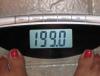
Another pound and onederland all in one day. Yipeeeeeee!

post-250602-13813138588322_thumb.jpg

  • Author
Another pound and onederland all in one day. Yipeeeeeee!

LMAO- I LOVE the picture!! YAY to onederland...I cant wait to be ther FOUR LBS TO GO and I think I'll take a picture too!!!!! CONGRATS!!!:thumbup:

Thanks kaninag - I'm leaving in about 1 hour to go to my band doctor - don't think I need a fill, but I'm definitely bringing the picture!!!

Join the conversation

You can post now and register later. If you have an account, sign in now to post with your account.

Guest
Reply to this topic...

Account

Navigation

Search

Search

Configure browser push notifications

Chrome (Android)
  1. Tap the lock icon next to the address bar.
  2. Tap Permissions → Notifications.
  3. Adjust your preference.
Chrome (Desktop)
  1. Click the padlock icon in the address bar.
  2. Select Site settings.
  3. Find Notifications and adjust your preference.