Skip to content
View in the app

A better way to browse. Learn more.

BariatricPal

A full-screen app on your home screen with push notifications, badges and more.

To install this app on iOS and iPadOS
  1. Tap the Share icon in Safari
  2. Scroll the menu and tap Add to Home Screen.
  3. Tap Add in the top-right corner.
To install this app on Android
  1. Tap the 3-dot menu (⋮) in the top-right corner of the browser.
  2. Tap Add to Home screen or Install app.
  3. Confirm by tapping Install.

All the Feels

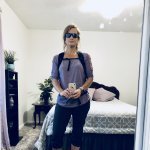
So, the first picture is of me 1 year ago 4/2017. I had vsg 12/6/17. The second picture is me today 4 1/2 months post op and down 85 pounds. Absolutely incredible!

HW 335

CW 250

Ht 5'10

FB_IMG_1522719750919.jpg20180422_160543.jpg

Sent from my SM-N950U using BariatricPal mobile app

  • Replies 16
  • Views 3.2k
  • Created
  • Last Reply

Featured Replies

WOW! Nice work! Love the identical pic for comparison:) What a cool idea! It IS an incredible difference. Go, girl, go!

I love the identical pic idea too! Crazy changes lady, brava!!!

Wow, congrats!

Oh, my! You look amazing. Thanks for sharing your inspirational pics!

Looking good! And cute photos :-)

12 hours ago, Gingerly said:

first picture is 1 year ago - second picture me today 4 1/2 months post op down 85 pounds

@Gingerly

Look at you.!!!

great pics and weight loss

i think your hat even is smaller;)

keep up the good work

kathy

congrats

You look amazing. Congrats.

  • 2 weeks later...

You look mahvelous dahling! Congrats on your hard work paying dividends!!!

Happy to meet you Gingerly,you sure have made a beautiful change in yourself, know it took hard work but it seems to have paid,off. Congratulations again.

Great job, well done!! You look amazing!!


wonderful idea and great job :)

Archived

This topic is now archived and is closed to further replies.

Trending Products

PatchAid Vitamin Patches

Account

Navigation

Search

Search

Configure browser push notifications

Chrome (Android)
  1. Tap the lock icon next to the address bar.
  2. Tap Permissions → Notifications.
  3. Adjust your preference.
Chrome (Desktop)
  1. Click the padlock icon in the address bar.
  2. Select Site settings.
  3. Find Notifications and adjust your preference.