




Skip to content
View in the app

A better way to browse. Learn more.

BariatricPal

A full-screen app on your home screen with push notifications, badges and more.

To install this app on iOS and iPadOS
  1. Tap the Share icon in Safari
  2. Scroll the menu and tap Add to Home Screen.
  3. Tap Add in the top-right corner.
To install this app on Android
  1. Tap the 3-dot menu (⋮) in the top-right corner of the browser.
  2. Tap Add to Home screen or Install app.
  3. Confirm by tapping Install.

Join BariatricPal free

  • Ask your own questions
  • Reply and follow topics
  • Message other members
  • No cost, no spam

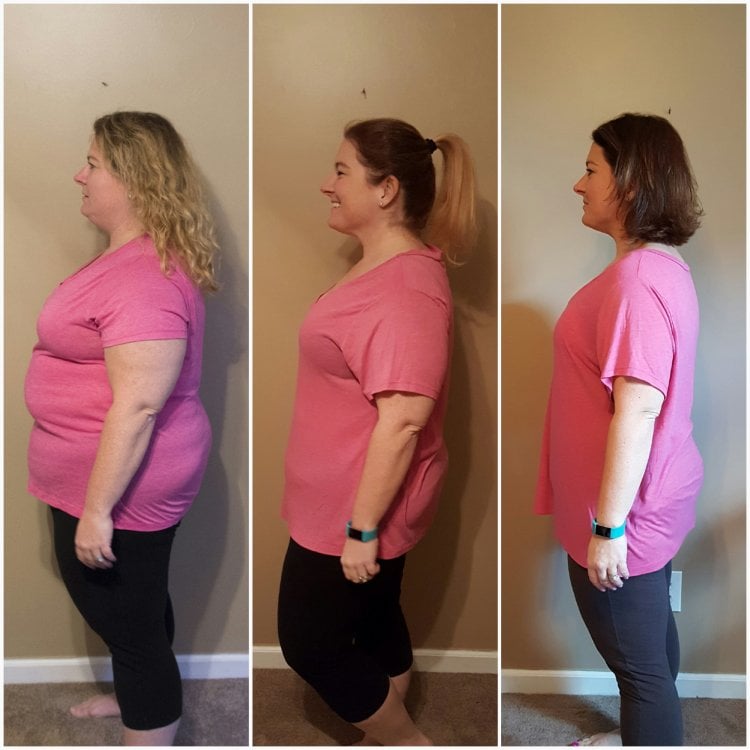
6 months! Before, 3 months & 6 months photos!

Wow...what a journey! I remember the dreaded 6 months pre-op and now I am 6 months post-op!

Started at 260 and am now 175. Down 85lbs. About another 30 or so to go! So weird to be only 30lbs away from the end goal. Never in my life....20170327_111918.thumb.jpg.2788287d8b9ca2a7e44b89efd2ce7e47.jpg
20170214_104203.jpg

20170322_104540.jpg

20170325_152717.jpg

20170325_152937.jpg

20170327_111656.jpg

20170327_112241.jpg

  • Replies 33
  • Views 17.4k
  • Created
  • Last Reply

Featured Replies

  • Author

Wow you guys!! Thanks for all of the wonderful messages! Here are my personal rules i live by now... I dont measure and I dont track but I am good at estimating. I try to drink 1 protein shake each day (premier is my fav) and/or eat a protein bar while on the go (I am in love with the "oh yeah- one" bars). I drink a ton of water, sometimes with Crystal-Light. I enjoy a cup of coffee every morning. Any breads, desserts, or sugary drinks are out the door. I make sure I eat my protein first but I eat all day long. I enjoy running now and hiking! I excersize almost everyday. Even though I just gained 3 lbs, I went down another size...must be building muscle. [emoji6]

Sent from my SM-N920V using BariatricPal mobile app

Fantastic! Thank you for sharing your journey!


Archived

This topic is now archived and is closed to further replies.

Account

Navigation

Search

Search

Configure browser push notifications

Chrome (Android)
  1. Tap the lock icon next to the address bar.
  2. Tap Permissions → Notifications.
  3. Adjust your preference.
Chrome (Desktop)
  1. Click the padlock icon in the address bar.
  2. Select Site settings.
  3. Find Notifications and adjust your preference.