




Skip to content
View in the app

A better way to browse. Learn more.

BariatricPal

A full-screen app on your home screen with push notifications, badges and more.

To install this app on iOS and iPadOS
  1. Tap the Share icon in Safari
  2. Scroll the menu and tap Add to Home Screen.
  3. Tap Add in the top-right corner.
To install this app on Android
  1. Tap the 3-dot menu (⋮) in the top-right corner of the browser.
  2. Tap Add to Home screen or Install app.
  3. Confirm by tapping Install.

Join BariatricPal free

  • Ask your own questions
  • Reply and follow topics
  • Message other members
  • No cost, no spam

I have come further than I thought...

  • Popular Post

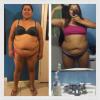
It's been 8 weeks, 2 months, since my surgery and I have lost 47 lbs, and 7 inches off my waist, I wanted to put this up as a motivational reminder to myself.post-305104-1482350714639_thumb.jpg
  • Replies 12
  • Views 1.1k
  • Created
  • Last Reply

Featured Replies

Yeah! Look at that! Awesome! I know it's a burden to carry most of your weight in your midsection when you are obese, but at the same time, it makes for some seriously dramatic before and after shots. Keep 'em coming!

PS: Congrats on reaching Onederland!

  • Author

Yeah! Look at that! Awesome! I know it's a burden to carry most of your weight in your midsection when you are obese, but at the same time, it makes for some seriously dramatic before and after shots. Keep 'em coming!

PS: Congrats on reaching Onederland!

It really has been a burden, being plus sized never meant a huge booty and chest for me. Thanks for the encouragement, I really appreciate it

Sent from my LG-K330 using the BariatricPal App

  • Author
  • Popular Post

Biggest difference is definitely my side shot.

post-305104-14823533068783_thumb.jpg

Wow!!! That's amazing! Good for you hon.

Sent from my iPhone using the BariatricPal App

Archived

This topic is now archived and is closed to further replies.

Account

Navigation

Search

Search

Configure browser push notifications

Chrome (Android)
  1. Tap the lock icon next to the address bar.
  2. Tap Permissions → Notifications.
  3. Adjust your preference.
Chrome (Desktop)
  1. Click the padlock icon in the address bar.
  2. Select Site settings.
  3. Find Notifications and adjust your preference.