Start here
Where are you in your journey?
Choose the path that fits today. We’ll take you to the most useful discussions.
- GLP-1 medication Zepbound, Wegovy, access, side effects, progress, and support.
- Before surgery Compare procedures, plan ahead, and get honest pre-op answers.
- Post-op Recovery, food stages, symptoms, and support.
- Long-term Regain, labs, habits, and life after the honeymoon.
- Revision Explore revision options, complications, and next steps.
Protein on the go
- Replies 4
- Views 926
- Created
- Last Reply
Featured Replies
Archived
This topic is now archived and is closed to further replies.
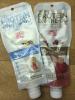
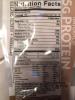
Just discovered these and had to try them, so great for keeping a few in the car or gym bag! It's 25g whey Protein (mix of isolate, concentrate and hydrolysate so if you need isolate only it's not for you) 8g carb and 150cal PLUS electrolytes!
It comes in this pouch like a juice drink and you mix with Water right in the pouch so you don't need a shaker bottle and they last like 18 months.
I tried one and it's not quite as good as the Syntrax Matrix I like but not half bad. All natural with stevia/sugar blend (4g sugar). I wouldn't use it every day but perfect for emergency supply!
I got it from their website but they have it on amazon and in stores too.