




Skip to content
View in the app

A better way to browse. Learn more.

BariatricPal

A full-screen app on your home screen with push notifications, badges and more.

To install this app on iOS and iPadOS
  1. Tap the Share icon in Safari
  2. Scroll the menu and tap Add to Home Screen.
  3. Tap Add in the top-right corner.
To install this app on Android
  1. Tap the 3-dot menu (⋮) in the top-right corner of the browser.
  2. Tap Add to Home screen or Install app.
  3. Confirm by tapping Install.

Join BariatricPal free

  • Ask your own questions
  • Reply and follow topics
  • Message other members
  • No cost, no spam

BariatricPal profile- who is it?

On the phone app, my profile has someone else's data. The only thing right is my screen name. Whose data is this and how can it be fixed? post-161802-14462599359789_thumb.jpg
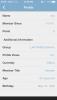
Thanks!

  • Replies 8
  • Views 917
  • Created
  • Last Reply

Featured Replies

It's just a hiccup in the software. Refresh the page and it should reset itself.

  • Author

It's just a hiccup in the software. Refresh the page and it should reset itself.

I tried this that but it still shows the same bogus profile in the app. Is it just me or is this what other see in the app? I am aware that on the desktop version my info is correct.

post-161802-14467180499775_thumb.jpg

  • Author

Notice that the member info stayed the same in these screen shots but that the number of profile views increased so this profile seems to be live versus a static glitch in need of refreshing. Either way, all of the data is wrong, e.g. I have never had a lap-band.

It's the phone app glitching. You might try clearing your cache but if it's showing correctly on desktop, I wouldn't worry.

Will it allow you to change the information?

  • Author

It's the phone app glitching. You might try clearing your cache but if it's showing correctly on desktop, I wouldn't worry.

I did clear the cache. I agree it may not be too big of a deal except that people respond to my posts incorrectly. For example, I posted a picture awhile back and got "Wow, I can't believe you are 60." Me either since I'm 20 years younger. Also since I only post in the sleeve, veteran, and maintenance forums, being listed as a newbie lap-band patient doesn't really work. ????

Does my profile errors show on the mobile apps for others?

  • Author

Will it allow you to change the information?

I don't think so on the mobile app. Desktop, yes, but it is correct on desktop.

Yes on mobile it has you listed as a lap band patient. Try emailing @AlexBrecher perhaps he can assist.

Archived

This topic is now archived and is closed to further replies.

Account

Navigation

Search

Search

Configure browser push notifications

Chrome (Android)
  1. Tap the lock icon next to the address bar.
  2. Tap Permissions → Notifications.
  3. Adjust your preference.
Chrome (Desktop)
  1. Click the padlock icon in the address bar.
  2. Select Site settings.
  3. Find Notifications and adjust your preference.