




Start here
Where are you in your journey?
Choose the path that fits today. We’ll take you to the most useful discussions.
- GLP-1 medication Zepbound, Wegovy, access, side effects, progress, and support.
- Before surgery Compare procedures, plan ahead, and get honest pre-op answers.
- Post-op Recovery, food stages, symptoms, and support.
- Long-term Regain, labs, habits, and life after the honeymoon.
- Revision Explore revision options, complications, and next steps.
Can somebody tell me what these are called?!
- Replies 2
- Views 805
- Created
- Last Reply


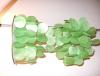
I bought this thing this weekend... even though I didn't absolutely love the colour (though, it'll probably look nice when the light hits it). If you can't tell from the pic, its a 'mobile' with those flat, iridescent-y shells.
I have this idea that I'd like to make my own, with shells the colour *I* want them to be. But I have no idea what those shells are called, to look up somewhere online to buy them. I can't just say 'sea shells', cause I'm not getting the results I want. Anyone have any clue?
(sorry it's sideways!)