Skip to content
View in the app

A better way to browse. Learn more.

BariatricPal

A full-screen app on your home screen with push notifications, badges and more.

To install this app on iOS and iPadOS
  1. Tap the Share icon in Safari
  2. Scroll the menu and tap Add to Home Screen.
  3. Tap Add in the top-right corner.
To install this app on Android
  1. Tap the 3-dot menu (⋮) in the top-right corner of the browser.
  2. Tap Add to Home screen or Install app.
  3. Confirm by tapping Install.

Join BariatricPal free

  • Ask your own questions
  • Reply and follow topics
  • Message other members
  • No cost, no spam

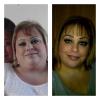
Yay Lost 70Lbs Update Pic

  • Replies 32
  • Views 3.1k
  • Created
  • Last Reply

Top Posters In This Topic

Most Popular Posts

  • chitowngirl
    chitowngirl

    Awesome..it looks like you lost 20 years along with those 70 pounds. Keep up the good work.

  • welittle1
    welittle1

    You look amazing but I think you were beautiful before too...just healthier now. Can't wait till I can post pictures like that! Congrats!

  • Congrats, you look beautiful!!!

Posted Images

Featured Replies

  • Author

Thank you all so much for all your lovely comments will keep you posted with upto date weight loss , I had a 36f Bougie I found out today by my surgeon which is normaly used here in the uk , all the best to you all and those pounds will soon come off just listen to your sleeve and body , thanks x

Join the conversation

You can post now and register later. If you have an account, sign in now to post with your account.

Guest
Reply to this topic...

Account

Navigation

Search

Search

Configure browser push notifications

Chrome (Android)
  1. Tap the lock icon next to the address bar.
  2. Tap Permissions → Notifications.
  3. Adjust your preference.
Chrome (Desktop)
  1. Click the padlock icon in the address bar.
  2. Select Site settings.
  3. Find Notifications and adjust your preference.