Start here
Where are you in your journey?
Choose the path that fits today. We’ll take you to the most useful discussions.
- GLP-1 medication Zepbound, Wegovy, access, side effects, progress, and support.
- Before surgery Compare procedures, plan ahead, and get honest pre-op answers.
- Post-op Recovery, food stages, symptoms, and support.
- Long-term Regain, labs, habits, and life after the honeymoon.
- Revision Explore revision options, complications, and next steps.
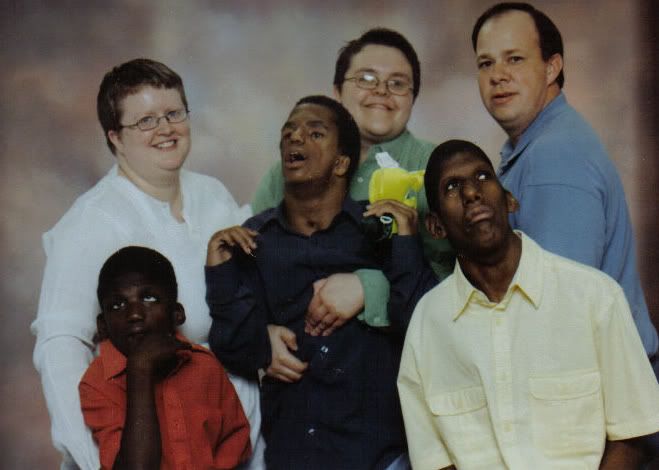
Family pictures.
- Replies 32
- Views 2.9k
- Created
- Last Reply
Top Posters In This Topic
-
sbmorgaine 9 posts
-
FunnyDuddies 4 posts
-
maryb 4 posts
-
Bettina 3 posts







We recently got pictures of our "family" taken, and I am so proud of my boys. Anyone else want to share???
Here are the people in our neighborhood! White shirt is my partner Erin, then green shirt is me. The guy is one of our staff workers/best friend, Jason. Then the littlest boy is Brandon, the one I am holding is Carlos (his legs are completely off the floor) and the yellow shirt is Roy. Roy and Brandon are half brothers, and Carlos and Roy have lived together for over 10 years, so they are "brothers".