




Start here
Where are you in your journey?
Choose the path that fits today. We’ll take you to the most useful discussions.
- GLP-1 medication Zepbound, Wegovy, access, side effects, progress, and support.
- Before surgery Compare procedures, plan ahead, and get honest pre-op answers.
- Post-op Recovery, food stages, symptoms, and support.
- Long-term Regain, labs, habits, and life after the honeymoon.
- Revision Explore revision options, complications, and next steps.
New Goal to "twoterville"
- Replies 17
- Views 1.7k
- Created
- Last Reply
Top Posters In This Topic
-
granlady 4 posts
-
waterlily1072 3 posts
-
LapBandit 2 posts
-
Elisabethsew 1 post


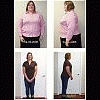

OK folks, I have 18lbs to "Twoterville" I just got a second fill bringing me up to 6.5cc's in my 10cc band. I seem to be holding the restriction, last time the swelling went down 2 days later and this is day 4 today (crossing my fingers and toes) Yesterday was my first day of full on solid food after the fill and if this level of restriction stays I will be very happy. My goal is to get to twoterville in the next 4 weeks, making a total loss of 50lbs !!! Just putting my goal out here so I can't fudge on it later, I am committed to it.
PS I know that is a lot to lose in 4 weeks, but I like to dream big and think positive. Besides if you shoot for the stars you know you will at least hit the moon