




Start here
Where are you in your journey?
Choose the path that fits today. We’ll take you to the most useful discussions.
- GLP-1 medication Zepbound, Wegovy, access, side effects, progress, and support.
- Before surgery Compare procedures, plan ahead, and get honest pre-op answers.
- Post-op Recovery, food stages, symptoms, and support.
- Long-term Regain, labs, habits, and life after the honeymoon.
- Revision Explore revision options, complications, and next steps.
A great stretch move in the AM, and for when you get stuck...
- Replies 1
- Views 735
- Created
- Last Reply
Top Posters In This Topic
-
plain 1 post

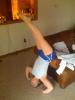
This is not for the faint of heart... and it is definitely a move for after you've lost some of your weight... I do this move in the AM when I wake up. I slide myself backwards off the side of the couch till I am head down and put myself into a headstand. My legs go all the way up, and then I point them forward as pictured here. I will hold this move for a couple minutes, and can feel my muscles loosen through my legs and back. I also do this move if I have back pain from being stuck. I'll start by having my back curved over the back of the couch and hold the curve. You can feel the loosening of the muscles and food. Then I'll complete the move as above...
Just wanted to share, cause it is a GREAT way I start my morning and I always feel super refreshed... And DON'T LAUGH at my awkwardness! :biggrin: