




Skip to content
View in the app

A better way to browse. Learn more.

BariatricPal

A full-screen app on your home screen with push notifications, badges and more.

To install this app on iOS and iPadOS
  1. Tap the Share icon in Safari
  2. Scroll the menu and tap Add to Home Screen.
  3. Tap Add in the top-right corner.
To install this app on Android
  1. Tap the 3-dot menu (⋮) in the top-right corner of the browser.
  2. Tap Add to Home screen or Install app.
  3. Confirm by tapping Install.

Join BariatricPal free

  • Ask your own questions
  • Reply and follow topics
  • Message other members
  • No cost, no spam

What do You do to monitor losses?

6 weeks post op and down 29 pounds! I don't look any different, but my clothes sure are getting looser!
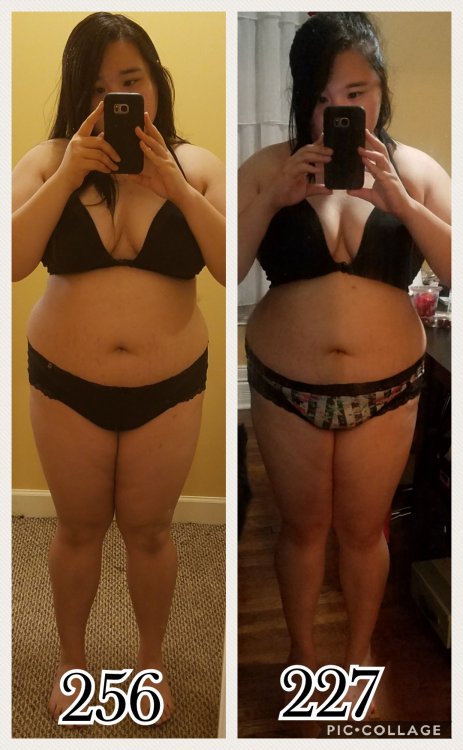
2 inches down on my bust, 1-2 inches down on my waist, and 3 inches down on my hips/butt.

What methods do you use to track your weight/fat loss?

594c61e355636_Collage2017-06-2211_23_51.thumb.jpg.b4ddb951bbc9d49536c4c3718d69eb11.jpg20170622_154121.thumb.jpg.44a7cf60f5ac54be2654522f0da744eb.jpg

  • Replies 2
  • Views 532
  • Created
  • Last Reply

Featured Replies

I disagree that you don't look any different! A really good hourglass is coming in there.

I definitely measure by how my clothes fit. I can not lose an ounce for two weeks, but I feel my clothes magically start to loosen during that stall.

6 weeks post op and down 29 pounds! I don't look any different, but my clothes sure are getting looser!

2 inches down on my bust, 1-2 inches down on my waist, and 3 inches down on my hips/butt.

What methods do you use to track your weight/fat loss?

594c61e355636_Collage2017-06-2211_23_51.thumb.jpg.b4ddb951bbc9d49536c4c3718d69eb11.jpg20170622_154121.thumb.jpg.44a7cf60f5ac54be2654522f0da744eb.jpg

Way to go! Keep up the good work. Two steps forward is getting you there.


Aka_ET

"You may see me struggle but you will never see me quit"

Archived

This topic is now archived and is closed to further replies.

Account

Navigation

Search

Search

Configure browser push notifications

Chrome (Android)
  1. Tap the lock icon next to the address bar.
  2. Tap Permissions → Notifications.
  3. Adjust your preference.
Chrome (Desktop)
  1. Click the padlock icon in the address bar.
  2. Select Site settings.
  3. Find Notifications and adjust your preference.